Wednesday, November 19, 2014
Sony Ericsson Xperia Mini Pro Manual
 |
| Sony Ericsson Xperia Mini Pro Manual |
Design
User Manual Here Sony Ericsson Xperia Mini Pro Manual

Monday, September 8, 2014
User Manual Pdf Sony Xperia J

As described at Sony Mobile website, Sony Xperia J comes with these specification and features:
- Network: HSDPA
- Platform: Android v4.0.4 ICS OS (planned upgrade to v4.1 Jelly Bean OS)
- Processor: 1 GHz Cortex-A5
- GPU: Adreno 200
- Display: 4.0 inches TFT capacitive touchLcd display, 480 x 854 pixels, 16M colors
- Internal memory: 4 GB (2 GB user available), 512 MB RAM
- Rear Camera: 5 MP, 2592х1944 pixels, autofocus, LED flash
- Front Camera: VGA
- Camera Features: Geo-tagging, touch focus, image stabilization
- Video: VGA
- Data speed: HSDPA 7.2 Mbps; HSUPA 5.76 Mbps
- WLAN: Wi-Fi 802.11 b/g/n, DLNA, Wi-Fi hotspot
- Bluetooth: v2.1 with A2DP, EDR
- Location: GPS with A-GPS support
- Battery: Non-removable Li-Ion 1750 mAh battery
- Talk time: Up to 7 h 18 min
- Standby time: Up to 618 h
- Colors: Black, White, Gold, Pink
- Price: 180 EUR
Troubleshooting tips of Sony Xperia J at a glance.
How to reset the phone without erasing personal data?
Solution:
1. From your Home Lcd, tap application.
2. Find and tap Settings -> Backup & reset.
3. Tap Settings reset -> Reset phone.
4. To confirm, tap Reset settings.
Why your wired headset does not work?
Solution:
- Make sure the wired headset that you are using complies to the CTIA standard. Your phone supports the CTIA standard, and may not be fully compatible with other standards, such as OMTP.
- If you have a wireless headset that is compatible with your phone, try using that instead.
Why the Internet-based services is cannot use?
Solution:
- Make sure your subscription covers data downloads and that the Internet settings in your phone are correct.
- Contact your network operator for more information about your subscription settings.
To know more about troubleshooting tips and how to operate your Sony Xperia J smartphone, you can download this Sony Xperia J user manual below.
Table contents of Sony Xperia J user manual
- Important information
- Getting started
- Getting to know your phone
- Calling
- Contacts
- Messaging
- Google Talk
- Getting started with Google Play
- Synchronizing data on your phone
- Connecting to wireless networks
- Web browser
- Music
- Using the FM radio
- Taking photos and recording videos
- Connecting your phone to a computer
- Using location services to find your position
- Locking and protecting your phone.
- Updating your phone
- Troubleshooting
- Index
Download Sony Xperia J User Manual.PDF (8.78 MB)
Sony Xperia Z Manual User Guide
>> Download Sony Xperia Z Manual User Guide
Saturday, September 6, 2014
Sony Xperia Ion and Sony Xperia S Compare User Manual
 |
| Google Images |
Tuesday, November 26, 2013
Sony Xperia Arc S User/Owner Manual
Models :
Sony Xperia Arc S Quick Reference manual
 |
Sony Xperia Arc S |
The top there is an HDMI output port, dian a very small power button.
Xperia Arc S supports bluetooth headset
[ Get Xperia Arc S User Manual here ]
Saturday, November 23, 2013
Sony Ericsson Xperia Active User/Owner Manual

Spec
Models
The shape is a bit quirky with a lump in the bottom hole to insert the hook into it. Added to the right side of the volume control and camera shutter. While the bottom there is a USB port and headset covered with a rubber cover.
Sony Ericsson Xperia Active has the features office in the form of an Office application suite.
[ Get Sony-Ericsson-Xperia-Active User Manual here ]
Saturday, October 19, 2013
Sony Xperia U User Guide Manual Pdf
 |
Saturday, October 12, 2013
Sony Xperia T User Guide Manual Pdf
 |
Monday, August 26, 2013
Sony Ericsson Xperia Mini Pro User Manual
|
| source image : www.google.com |
Models
The manual documentation Can be found Click Here
Monday, August 19, 2013
Sony Ericsson Xperia Play User Manual

Models
Sunday, August 18, 2013
Sony Xperia P User Manual
 |
| Google Images |
- Network: GSM 850 / 900 / 1800 / 1900, HSDPA 850 / 900 / 1900 / 2100 - LT22i.
- Weight: 120 g.
- STE U8500 Chipset, DB8500.
- It has 4.0 inches, LED-backlit LCD, capacitive touchscreen, 540 x 960 pixels resolution and support 16M colors with Scratch-resistant glass protection and 4 fingers. Then Sony WhiteMagic technology, Sony Mobile BRAVIA Engine and Timescape UI.
- Equipped with 8 mega pixels camera with autofocus, LED flash and other features like Geo-tagging, touch focus, face and smile detection, 3D sweep panorama, image stabilization.
- Video: 1080p@30fps, continuous autofocus, video light.
- Available: 16 GB (13 GB user-available), 1 GB RAM.
- Data: GPRS (Up to 100 kbps), EDGE (Up to 296 kbps), HSDPA 14.4 Mbps, HSUPA 5.76 Mbps
- Connectivity: Wi-Fi 802.11 b/g/n, Wi-Fi hotspot, DLNA, bluetooth 2.1 with A2DP, EDR, microUSB v2.0, USB On-the-go support, A-GPS support.
- Powered by Li-Ion 1305 mAh battery capacity (standby: Up to 470 h (2G) / Up to 475 h (3G), talk time: Up to 6 h (2G) / Up to 5 h (3G), music play: Up to 80 h).
- Other features and specs: HTML5, Adobe Flash, SNS integration, HDMI port, MP4/H.263/H.264/WMV player, MP3/eAAC+/WMA/WAV player, Google Search, Maps, Gmail,YouTube, Calendar, Google Talk, Document viewer, Java MIDP emulator.
Download Free Sony Xperia P User Manual Guide France
Thursday, August 8, 2013
Sony Xperia V LT25i Review and Test
 |
| Sony Xperia V LT25i |
Waterproof
with
Superior Camera
Since leaving the name of Ericsson, Sony has two smartphones starting with the ability to "Waterproof". However, what is presented through Sony Xperia V, clearly set new standards have not yet been achieved Go, and Acro S.
Features
| HSDPA 3G WIFI Bluetooth Infrared Browser Java MIDP GPS Internal Applications Navigator | Yes Yes Yes Yes No Yes Yes Yes Yes | Camera Video Call Memory Ext Music Player Video Player Video Recorder OS On Radio FM | Yes Yes Yes Yes Yes Yes Yes Yes Yes |
Design
Dimension 129 x 65 x 10.7 mm, 120 gram; full touchscreen; Plastic material and scratch-resistant glass; port audio 3,5mm; volume rocker; power button / lock; dustproof and water ( IP55 / IP57 )

Our blog is new?!?!
You can send critiques and suggestions via the contact us or comment ...
gratitude..
Tuesday, July 16, 2013
Sony Xperia Sola User Manual Guide
Free download online Sony Xperia Sola User Manual Guide. Sony Xperia Sola is an innovative smartphone. In the sales package given by Sony, consumers will get a USB cable, charger adapter, SmartTag, and headset. Design of Sony Xperia Sola looks charming and entirely new. Unfortunately, although Ice Cream Sandwich has been circulated widely, Sony Xperia Sola still using Android OS 2.3 Gingger Bread. Of course we have to hope Sony give Ice Cream Sandwich update for this smartphone.Luckily Sony gives advantages to the Sony Xperia Sola by implanting Floating Touch Display feature. This technology allows us to select the menu without having to touch the screen, so just by hovering your finger to the screen then the menu will be selected by itself. In order to get more leverage features, Sony immerse NovaThor U8500 chipset, processor speed 1GHz dual-core processor, and 512 MB of RAM.
Here you can get Sony Xperia Sola User Manual Guide for more reference about the samrtphone.Body design is a bit strange when viewed as part of the screen and the bottom has a different thickness. At the bottom of the screen slightly lower thickness than the screen. In the meantime, the design is comfortable enough to be seen but if it were hold, influential or not depends on who is holding.The 3.7 inches screen on the Sony Xperia Sola shows sharp colors and good contrast. This is influenced by the Mobile Bravia technology which has always been a mainstay feature every Xperia series. With this screen we can see amazingly images from the 5MP camera with 2592?1944 pixels maximum resolution. Now please download the Sony Xperia Sola User Manual Guide below.get here
Sunday, July 14, 2013
The New Xperia ZR Waterproof and Dustproof Press Release

After issuing the latest smartphone product Sony Experia ZL and SONY Xperia SP, Sony once again Sony Xperia ZR will introduce more innovative
Just like the Xperia Z, the Xperia ZR is waterproof and dust-resistant. This time, Sony is not just advertising the fact that the Xperia ZR can survive underwater but that you can actually use it there, particularly for taking 13 megapixel pictures and full HD videos with the camera and dedicated shutter button.

- Sleek and durable smartphone with the highest level of water-resistance for filming in Full HD underwater
- Capture perfect photos and videos in any conditions with the 13 MP fast capture camera with HDR video and “Exmor RS for mobile”
- Generous 4.6” HD Reality Display with Mobile BRAVIA Engine 2 for sharp and bright viewing experience
- Widest range of NFC-enabled accessories for the greatest choice in one-touch sharing and viewing experiences
The ultimate in durable design
Xperia ZR is precision-crafted to handle whatever life throws at it. With its sleek, yet durable design, the Xperia ZR is your perfect companion in and out of the water. As well as being dust-resistant, this waterproof phone is IP55 and IP58 compliant, so you can keep it submerged in 1.5 meters of fresh water for up to 30 minutes. Combined with its dedicated camera key, the waterproof capabilities let you shoot videos in Full HD or snap pictures underwater, capturing the sharpest visuals. The camera key also allows you to shoot even from a locked screen, meaning you’ll never miss a moment again.

Featuring Sony’s “Exmor RS for mobile” image sensor with HDR (High Dynamic Range) for both photos and videos, the Xperia ZR captures perfect pictures and videos, no matter what the conditions. Superior Auto mode combines Scene Recognition with high quality performance image processing technology (HDR and noise reduction) to automatically shoot with the most optimal settings. And when you want to capture action fast, simply turn on burst mode to shoot an unlimited number of images at 15 frames per second.
Xperia ZR also features Battery STAMINA Mode which significantly improves the standby time of your smartphone by four times or more, by automatically shutting down battery-draining apps whenever the screen is off and starting them up again when the screen is back on.
The solid yet comfortable styling of the Xperia ZR is matched by a choice of classic and fresh colours - black, white, pink and mint – each allowing you to express your individual style.
High quality viewing experience
Enjoy entertainment on the go with the super-sharp 4.6” HD Reality Display powered by Mobile BRAVIA Engine 2 using the contrast enhancement technology expertise from Sony’s range of BRAVIA TVs, which together with the beautifully designed OptiContrast™ panel, delivers a beautiful high quality viewing experience.
The OptiContrast™ panel reduces reflections and provides clearer viewing, even in bright sunlight, and creates a seamlessly black surface when the phone is turned off. By eliminating the sensor layer and integrating the sensor on the lens, responsiveness of the screen is increased, so now your touch is both more effective and more intuitive. And with Sony’s unique prediction filter to help better detect the movement of your finger, scrolling on the Xperia ZR is reassuringly smooth.
Consistent Sony media entertainment experiences
The “WALKMAN”, Album and Movies applications enable discovery of online and offline content through a single access point with new ways to enjoy and share that content. The “WALKMAN” application provides access to all your downloaded music, a library of over 20 million songs to explore from Music Unlimited and Facebook social integration. The Movies application provides access to over 150,000 movies and TV series from Video Unlimited. The Album application enables easy access to Facebook friends’ photos and browsing photos by location. A new feature of this app is ‘Faces’ which recognizes and sorts the faces in your photo album so you can tag existing contacts or add names to familiar faces.
Ease of sharing and enjoyment
One-touch functions let you easily share music, photos and videos from your smartphone to the widest range NFC-enabled Sony devices, including speakers, headphones and TVs.
Joining the ever expanding range, the new Stereo Bluetooth™ Headset SBH50 is an advanced app-enabled wireless headset with built-in FM radio, OLED display and one-touch connection for wireless audio streaming. Simply touch your Xperia ZR once to the headset to instantly pair the devices and make a call or begin listening to tracks. The SBH50 is available in either black or white colour variants. Other accessories which complement the Xperia ZR are the Charging Dock DK28 and SmartWatch MN2.
Key features for Xperia ZR
- 4.6” HD Reality Display with Mobile BRAVIA Engine 2 for sharp and bright viewing experience
- 13MP fast capture camera with “Exmor RS for mobile” and HDR for perfect photos and videos in any conditions
- Waterproof and dust-resistant (IP55 /IP58) for the ultimate in durable design
- Qualcomm Snapdragon™ S4 Pro quad-core 1.5 GHz processor with 2GB RAM for fast performance
- Battery STAMINA Mode for outstanding battery life
From
For more information, images and videos please visit: www.sonymobile.com/pressreleases
Sony Mobile Communications, Global Communications & PR department
General Press: +44 208 762 5858
TP9BBQ7N4GYG
Saturday, July 13, 2013
Sony Xperia J Manual Updating and Troubleshooting
Sony Xperia J Manual, Updating and Troubleshooting - The Sony Xperia J manual in pdf format can help for owner of this smartphone. There are some important instructions in the Sony Xperia J manual for example resetting phone guide like How to reset the without erasing personal data?, then about Why your wired headset does not work?, Why the Internet-based services is cannot use?, using camera, using contacts, locking phone guide, using bluetooth, wi-fi connections, updating software, problem solving or troubleshooting and more.
Table of contents for Sony Xperia J User Manual
Important information
Getting started
Getting to know your phone
Calling
Contacts
Messaging
E-mail
Google Talk
Getting started with Google Play
Synchronizing data on your phone
Connecting to wireless networks
Web browser
Music
Using the FM radio
Taking photos and recording videos
Connecting your phone to a computer
Using location services to find your position
Locking and protecting your phone.
Updating your phone
Troubleshooting
Index
The Sony Xperia J smartphone support for HSDPA network. Its powered by 1 GHz Cortex-A5 procesor and runs on Android v4.0.4 ICS operating system. The platform can planned upgrade to v4.1 Jelly Bean. It has 4.0 inches TFT capacitive touchscreen display. The sony xperia j equipped with 5 MP camera and available 4 GB internal memory also 512 MB of RAM.
Download the SONY XPERIA J MANUAL / USER GUIDE here
Sony Ericsson Xperia Ray User Manual
 |
| source image : www.google.com |
Models
The manual documentation Can be found Click Here
Monday, July 8, 2013
Sony Xperia TL User Manual Guide
Free download online Sony Xperia TL User Manual Guide. Sony Xperia S has been officially released by AT & T as the official smartphone of James Bond. The Xperia S design has similarities with the international version of the Sony Xperia T.For the U.S. market specifications can be made to run on LTE networks. It has a screen size of 4.6-inch HD display, dual-core Snapdragon S4, 13 megapixel camera and NFC connectivity.
Get more information about the smartphone by download Sony Xperia TL User Manual Guide here. Sony Xperia T still use the mobile OS Android 4.0 Ice Cream Sandwich and will be getting an update to Android 4.1 Jelly Bean after the handset was officially launched in the United States. As the official James Bond smartphone, Sony Xperia S will get exclusive preload contains 007 agent film titled "Skyfall".Sony Xperia TL is really an exciting smartphone. Don’t hesitate to download the Sony Xperia TL User Manual Guide below. It’s free.get here
Free Download User Guide Manual Pdf Sony Xperia Acro S And Specification

- Network: HSDPA
- SIM: Mini-SIM
- Announced: 2012, May
- Released: 2012, August
- Dimensions: 126 x 66 x 11.9 mm
- Weight: 147 g (5.19 oz)
- Design: IP57 certified – dust and water resistant, Water proof up to 1 meter and 30 minutes
- Platform: Android OS, v4.0 (Ice Cream Sandwich), planned upgrade to v4.1 (Jelly Bean)
- Chipset: Qualcomm MSM8260 Snapdragon
- CPU: Dual-core 1.5 GHz Scorpion
- GPU: Adreno 220
- Display: 4.3 inches (~342 ppi pixel density) LED-backlit LCD, 720 x 1280 pixels, capacitive touchscreen, 16M colors
- Multitouch: Yes, up to 10 fingers
- Protection: Scratch-resistant shatter proof glass, Sony Mobile BRAVIA Engine
- Internal memory: 16 GB storage (11 GB user available), 1 GB RAM
- Card slot: microSD, up to 32 GB
- Rear Camera: 12 MP, 4000×3000 pixels, autofocus, LED flash
- Video: Yes, 1080p@30fps, continuous autofocus, video light, video stabilize
- Front Camera: Yes, 1.3 MP, 720p@30fps
- Camera Features: Geo-tagging, touch focus, face and smile detection, 3D sweep panorama, image stabilization
- Data Speed: HSDPA, 14.4 Mbps; HSUPA, 5.8 Mbps
- WLAN: Wi-Fi 802.11 b/g/n, Wi-Fi Direct, DLNA, Wi-Fi hotspot
- Bluetooth: Yes, v3.0 with A2DP, EDR
- NFC: Yes
- USB: Yes, microUSB v2.0, USB On-the-go support
- GPS: Yes, with A-GPS support and GLONASS
- Sensors: Accelerometer, gyro, proximity, compass
- 3.5mm jack: Yes
- Battery: Li-Ion 1910 mAh
- Stand-by time: Up to 310 h (3G)
- Talk time: Up to 7 h 10 min (3G)
- Music play: Up to 23 h
- Alert types: Vibration; MP3 ringtones
- Loudspeaker: Yes
- Messaging: SMS (threaded view), MMS, Email, IM, Push Email
- Browser: HTML5, Adobe Flash
- Video Player: MP4/H.263/H.264/WMV player
- Music Player: MP3/eAAC+/WMA/WAV player
- Radio: Stereo FM radio with RDS
- Java: Yes, via Java MIDP emulator
- Colors: White, Black, Pink
- Social Network Services: Yes
- HDMI port: Yes
- Active noise cancellation with dedicated mic: Yes
- Google apps: Google Search, Maps, Gmail, YouTube, Calendar, Google Talk
- Document viewer: Yes
- Predictive text input: Yes
Operating instrucion and troubleshooting tips of Sony Xperia Acro S smartphone at a glance
If your phone is not working as expected, try this solution below:
- Restart your phone.
- Remove and re-insert the SIM card. Then restart your phone.
- Force a restart of the phone if the phone hangs and can’t be restarted normally.
- Update your phone. Updating your phone ensures optimal performance and provides the latest enhancements.
- Reset your phone. (Be patient while resetting your phone. Restarting the phone during a reset procedure may damage the phone permanently.)
How to force the phone to shut down?
Solution:
1. Press and hold down both the volume up key and the power key for 10seconds.
2. After your phone vibrates three times, release the keys. The phone turns off automatically.
How to perform a factory data reset?
Follow the instruction below:
To avoid permanent phone damage, do not restart the phone while a reset procedure is underway.
1. From your Home screen, tap Apps.
2. Find and tap Settings -> Backup & reset.
3. Tap Factory data reset.
4. Tap Reset phone.
5. To confirm, tap Erase everything.
the other instruction smartphone
To know more about complete quick operating guide of Sony Xperia Acro S smartphone, you can download this Sony Xperia Acro S user manual below.
Table Contents of Sony Xperia Acro S user guide
- Important information
- Getting to know your phone
- Calling
- Contacts
- Messaging
- Getting started with Google Play
- PlayNow™ service
- Getting organized
- Scanning with the NeoReader application
- Synchronizing data on your phone
- NFC
- Connecting to wireless networks
- Web browser
- Listening to music with Walkman player
- Taking photos and recording videos
- Using the FM radio
- Playing video clips in Movies
- Sharing content with DLNA Certified devices
- Bluetooth wireless technology
- Connecting your phone to a computer
- Backup and restore application
- Locking and protecting your phone
- Updating your phone
- Troubleshooting
- Recycling your phone
- Legal information
- Index
This Sony Xperia Acro S user manual is available for FREE at Sony Mobile website, We merely collect the information, we neither affiliated with the author(s), the website and any brand(s) nor responsible for its content and change of content. (Read our disclaimer before you download the document from the website).
Download Sony Xperia Acro S User Guide.PDF (2.36 MB)
Saturday, July 6, 2013
SONY Xperia SP Specifications Features and Review
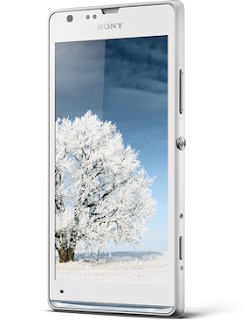
The Xperia SP comes with Android Jelly Bean (4.1), a 4.6 inch Mobile Bravia 2 Display and a resolution of 1280 x 720 pixels, a 1.7 Ghz dual-core processor, 8GB on-board memory with microSD support, 8 mega-pixel Exmor R camera and NFC & 4G LTE Support.
Physically, the SP measures 130.6 x 67.1 x 9.98 mm and weighs 155g so its pretty much an all round mid-range smartphone and this is just where Sony has placed it within the Xperia range. The Xperia SP will arrive sometime in either May, June or July and come in three colours : White, Red & Black.
Sony Xperia SP - Full Phone Specifications
GENERAL
- 2G NetworkGSM 850 / 900 / 1800 / 1900 - all versions
- 3G NetworkHSDPA 850 / 900 / 2100 - C5303 -HSDPA 850 / 900 / 1700 / 1900 / 2100 - C5302 -HSDPA 850 / 900 / 1900 / 2100 - C5306
- 4G NetworkLTE 800 / 850 / 900 / 1800 / 2100 / 2600 - C5303
- LTE 850 / 1700 / 1900 / 2100 - C5306
- SIMMicro-SIM
- 155 g
- 5.47 oz
- DISPLAY
- 4.6" touchscreen - scratch-resistant TFT
- 16,777,216 colours, 1280x720 pixels
- Corning Gorilla Glass
- 130,6 x 67,1 x 9,98 mm
- 5.14 x 2.64 x 0,39 inci
- 3G & 4G: HSDPA, 42 Mbps; HSUPA, 5.8 Mbps
- LTE, Cat3, 50 Mbps UL, 100 Mbps DL
- WLAN (WI-FI): Wi-Fi 802.11 b/g/n, Wi-Fi Direct, Wi-Fi hotspot
- EDGE: Yes
- GPRS: Yes
- Bluetooth: Yes, v4.0
- USB: Yes
- NFC: Yes
- GPS: Yes, with A-GPS support and GLONASS
- Google Android 4.1 (Jelly Bean)
- 1.7 GHz Qualcomm® Snapdragon™ S4
- MSM8960Pro Dual Core
- HSDPA, 42 Mbps; HSUPA, 5.8 Mbps; LTE, Cat3, 50 Mbps UL, 100 Mbps DL
- Li-Ion 2370 mAh battery
- Talk time (up to): 18 hours and 53 mins
- Standby time (up to): 734 hours
- Music listening time (up to): 39 hours
- Video playback time (up to): 7 hours and 36 mins
- 8 mp camera, 3264 x 2448 pixels
- Auto focus
- 16x digital zoom, pulsed LED flash
- Built-in Memory: 8 GB
- External Memory: 32 GB,microSD
- Ram: 1 GB RAM
- Loudspeaker: Yes
- 3.5mm jack: Yes
- Video Formats: MP4/H.263/H.264/WMV
- Audio Formats: MP3/eAAC+/WMA/WAV
- Radio: Stereo FM radio
- Other:SNS,TV-out,Document viewer
- SMS: Yes
- MMS: Yes:
- Push Mail: Yes
- IM: Yes
- Email; Yes
- Contrast enhancement
Contrast in images and video is enhanced by making the darkest parts slightly darker, which brings out details in the picture. - Colour Management
Colour saturation is increased for specified colour ranges, which makes the colours deeper and more vivid. And the intelligent Mobile BRAVIA® Engine 2 software reproduces skin colour exactly as it appears to the naked eye. - Noise reduction
Distortion and noise is reduced when streaming low-quality video from online sources, such as YouTube. Noise is reduced both to individual frames and between frames, for clearer viewing. - Sharpness filter
Mobile BRAVIA® Engine 2 applies a sharpness filter to increase the overall detail level in the image. This is done by enhancing the edges and contrast without increasing noise.
Disain

Quality precision craftsmanship
Xperia SP lifts craftsmanship to a whole new level. Using co-moulding technology which allowed us to create a unique solid design, this HD phone comes with a seamless look and feel that melts into ones hand. Paired with premium materials, Sony engineering and precision-crafted details, you’ll get a smartphone that lets you experience true design innovation.

Feel like you’re there with the razor sharp and super bright HD screen. An HD phone, Xperia SP brings you one of the highest levels of screen resolution available – 720 progressive scan, for crisp pictures and no jagged edges. Expertise from our BRAVIA® TV engineers goes into our mobile screens, to bring you the same quality you’d expect from a top quality HDTV. The 4.6” HD Reality Display provides razor sharp pictures – and superior brightness. And with the wide colour gamut it gives you the widest colour spectrum, so you can view every detail in vivid colour.
True Screen intelligence – Mobile BRAVIA® Engine 2 The second generation of our acclaimed Mobile BRAVIA® Engine, Mobile BRAVIA® Engine 2 delivers an even better viewing experience by adding new real-time contrast optimisation to the sharpness enhancement, high-quality colour management and noise reduction. Mobile BRAVIA® Engine 2 is also able to analyse content type and adjust the image accordingly. Adding Mobile BRAVIA® Engine 2 to the Reality Display makes for an intelligent screen – one that adapts automatically to display your content in the best way.
SONY Xperia SP - Review
JAPANESE PHONE MAKER Sony unveiled the Xperia SP smartphone earlier this week, along with the cheaper Sony Xperia L handset. Both phones should appeal to those that dont fancy coughing up big bucks for Sonys flagship Xperia Z smartphone, and they offer some of that handsets standout features. We got our mitts on the Sony Xperia SP handset, which looks nothing like its older, more expensive brother. The handsets fully plastic casing feels much cheaper than that of the Xperia Z, but thats okay, considering that its much cheaper. The XP isnt a bad looking device. We got the white model, which has a minimalistic, stylish feel to it, aided by the illuminating bar at the bottom of the phone that lights up to match whats showing on the screen.


Friday, June 28, 2013
Sony Xperia ZL Manual User Guide PDF
 |
| Google Image |