Showing posts with label zl. Show all posts
Showing posts with label zl. Show all posts
Wednesday, August 14, 2013
Sony Experia ZL Specifications and Features

It comes equipped with a 13 megapixel digital camera, which is drastically better than the average for all Smartphones and features a 5 inch screen, which is 35.1% larger than the average for all Smartphones. The included battery has a maximum talk time of 10 hours, which is 3 hours more than the average for all Smartphones. View all specs below.
Full Specifications of Sony Experia ZL
Weight
- 151 grams
- 5.33 ounces
- Manufacturer : Qualcomm
- Brand / family : Snapdragon S4 Pro
- Model : APQ8064
- Clock speed : 1.5 GHz
- Number of cores : 4
- 131.6 x 69.3 x 9.8 mm
- 5.18 x 2.7 x 0.39 inches
- Non-removable Li-Ion 2370 mAh battery
- Talk time (up to): 10 hours
- Standby time (up to): 500 hours
- Music play (p to): 40 hours
- 5 inch scratch-resistant TFT
- 16,777,216 color / 1920x1080 pixels
- Google Android 4.1 (Jelly Bean)
- 1.5 GHz Qualcomm APQ8064 Quad Core
- 13 megapixel Exmor RS camera with Auto focus and flash
- 2 MP, 1080p, front facing camera
- GSM : Yes
- GSM frequencies supported : 1900, 1800, 900, 850
- UMTS / HSPA : Yes
- UMTS frequencies supported : 900, 2100, 850
- LTE : Yes
- WWAN data standards supported : UMTS, LTE, EDGE, HSPA+, HSUPA, HSDPA, GPRS
- Wi-Fi : Yes
- GPS : Yes
- Bluetooth : Yes
- Bluetooth version : Bluetooth 4.0
- NFC support : Yes
- Tethering / mobile hotspot : Yes
- Media streaming : DLNA

Exmor RS™ for mobile – the world’s first image sensor with HDR video for smartphones
HDR for photos and videos captures natural colors in any light. HDR (High Dynamic Range) is an imaging technology used to capture clear photos against strong backlight. With HDR, the camera captures the same image at different exposure levels and layers them to create one optimized photo.
Xperia ZL introduces HDR to video, so that you can film even in high contrast situations, like in front of a window or with the sun behind your subject.
Always the right setting – Superior Auto
Now it’s always easy to get a great shot. With Superior Auto, you don’t have to know the ins and outs of camera settings to make use of them. In Superior Auto mode, the camera combines Scene Recognition with high quality and high performance image processing technology (HDR and noise reduction) to automatically shoot with the optimal settings. And your device is automatically optimized for 36 different scenes, so you always get the best shot.
Connectivity
- One-touch mirroring
See photos from your phone on your TV. Simply touch your smartphone to the remote from your BRAVIA® TV to activate screen mirroring. - One-touch backup
Whether you take pictures on your Xperia ZL smartphone, tablet or camera, now you can store them in the same place. The Sony Personal Content Station™ is a wireless hub for photos and videos. - One-touch listening
Play the music on your smartphone through a wireless speaker or wireless headphones. - One-touch sharing
Share photos, music and more between two phones, or between your phone and an NFC-enabled laptop.

Friday, June 28, 2013
Sony Xperia ZL Manual User Guide PDF
Sony Xperia ZL Manual User Guide Download Pdf Here you are the User Guide PDF Manual for Sony Xperia ZL directly from Sony Product official website. Sony Xperia ZL user guide in English, Download from the Links below. In 2013 it again epoch-era smartphone with a big screen, it was answered it by launching a large screen smartphone. Sony Xperia ZL itself brings TFT screen measures 5 Inches. These devices rely on a quad-core processor with a speed of 1.5 GHz. To accelerate system performance, do not miss the Sony membekalkan memory capacity of 2 GB RAM. If we trace on the operating system, as well as trends in 2013 OS is the most used Android v4.1 to run Jelly Bean. Sony Xperia ZL will be available in two colors, Black and White.
 |
| Google Image |
Indeed, Sony Xperia ZL body have in common with his brother, the Xperia Z. Mamun was different between the two phones is advanced, which has no protection against water or water repellent.
Thursday, June 27, 2013
Sony Xperia ZL Review and Price

Already sold on Sony’s latest Xperia Z handset? Not so fast. The Xperia Z isn’t the only great device that Sony announced at CES this year. Announced alongside the Z was the ZL, and it is very much its own beast of a phone.
With an equally robust feature set as the Z, the Xperia ZL is quite the charmer. It may lack the solid glass back the Xperia Z rocks, but it has quite a few tricks up its sleeve as well. That said, is the Xperia Z still the shining star in Sony’s lineup, or is the ZL up to snuff with its brother? In this review, we’ll see if the Xperia ZL has what it takes to be the next phone in your pocket.
DESIGN
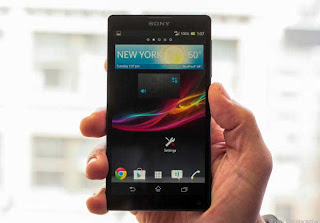
If youre expecting a luxurious build quality equal to that of the Xperia Z, you wont find it in the ZL. Unlike the Z, the Xperia ZL doesnt have a water- and dust-resistant chassis. The phone also has a more mundane plastic back and not the premium glass material the Xperia Z sports. Still, the ZLs textured back cover is pleasing to the touch, repels fingerprints, and offers a sure grip.
SOFTWARE
Running on Android 4.1.2, the Xperia ZL rocks one of the latest versions of the OS, and given that Sony is rather transparent when it comes to updating its handsets, youll likely be kept up to date as to when the ZL will be the next OS bump.
The software experience on the ZL, like the Z, is very unique. The UI is filled with small, enjoyable animations that arent in your face. Theres also a healthy amount of Sony-developed applications that will provide you with the full Xperia experience, like Walkman, Sony Select, Sociallife, Wisepilot for Xperia, Xperia Link, Remote Control, and much more. Sony also offers up an application called Update Center that allows you to update the Sony applications, as well as system updates.
Sony also provides a decent selection of widgets to adorn your ZLs home screen with. The photo gallery widget allows you to scroll through all of your photos with a nice 3D effect -- a nod to Timescape.
The software on the ZL also offers up eight different themes for your homescreen, with options like Silk, Amethyst, Sapphire, and Emerald. Once youve selected your theme, the notification LED will also change to the same color, which is a nice touch.
Sony offers up a pretty great photo gallery experience on the ZL. The application is divided into two tabs: Pictures and Albums. In the Pictures section, photos are divided by months, and you can easily pinch to zoom to get a better view of the photos without needing select a specific photo. When tapping on the Albums section, you can choose from Facebook, Picasa, and Globe, which will show you geo-tagged photos in a nifty 3D globe. You can also view photos from media servers on your home network.
CAMERA

HDR for photos and videos captures natural colours in any light. HDR (High Dynamic Range) is an imaging technology used to capture clear photos against strong backlight. With HDR, the camera captures the same image at different exposure levels and layers them to create one optimised photo.
Xperia ZL introduces HDR to video, so that you can film even in high contrast situations, like in front of a window or with the sun behind your subject.
As you also could expect, the camera on the Xperia ZL offers a top-notch experience. Sony has implemented some great features in the camera software, making it pretty fantastic. Sony knows a thing or two about cameras, given its Cybershot line of digital shooters, and that shines through within the Xperia ZL.
The 13 megapixel camera on the ZL takes advantage of Sonys next-gen Exmor RS sensor, which produces high quality photos across the board. Funny enough, the viewfinder doesnt do that great of a job showing the subject in low-light situations, but a visit to the gallery with show you a very clear image. Its pretty impressive. Likely the only other slight issue with the camera is that is can be a bit slow at times, but that will likely be remedied with an update.
The camera software provides a wealth of features, allowing you to do just about anything youd want on a smartphone camera and then some.
One of the features I enjoyed the most on the camera was the Superior Auto feature, which automatically changes the focus mode depending on the subject, proximity, or movement. If youre very close to the subject, the camera will automatically adjust to Macro mode. If youre catching a moving object, it will switch to action mode. Many phones have these features, but you manually need to change them, so its pretty cool to see that the Xperia ZL can do this on the fly.
Sony Xperia ZL see prices in your country
Look Sony Experia ZL Specifications and Features
Subscribe to:
Posts (Atom)