Monday, November 3, 2014
Nokia 808 PureView Manual

- Network: GSM 850 / 900 / 1800 / 1900, HSDPA 850 / 900 / 1700 / 1900 / 2100
- Weight: 169 g
- It has 4.0 inches, AMOLED capacitive touchscreen, 360 x 640 pixels resolution and support 16M colors with Corning Gorilla Glass and Nokia ClearBlack display protection
- Camera features: Carl Zeiss optics, autofocus, Xenon flash, 1/1.2 sensor size, ND filter, up to 3x loseless digital zoom, geo-tagging, face detection
- Video: 1080p@30fps, loseless digital zoom, LED light, VGA; VGA@30fps video recording
- Available 1 GB ROM, 512 MB RAM
- Data: GPRS, EDGE, HSDPA 14.4 Mbps, HSUPA 5.76 Mbps
- Connecctivity: Wi-Fi 802.11 b/g/n, DLNA, UPnP technology, bluetooth 3.0 with A2DP, microUSB v2.0, USB On-the-go support, A-GPS support
- Powered by Li-Ion 1400 mAh (BV-4D) standard battery capacity ( standby: Up to 465 h (2G) / Up to 540 h (3G), Talk time: Up to 11 h (2G) / Up to 6 h 50 min (3G))
- Other specs and features: SNS integration, Active noise cancellation with a dedicated mic, HDMI port, MP3/WMA/WAV/eAAC+ player, MP4/H.264/H.263/WMV player, Document viewer, Video/photo editor, HTML5, Adobe Flash Lite, MIDP 2.1, Stereo FM radio with RDS; FM transmitter, SMS, MMS, Email, Push Email, IM

Thursday, October 9, 2014
Download Lava Iris 354e PC Suite and USB Driver
Download Lava Iris 354e PC Suite/ USB Driver and User Manual
I am share link which is help on downloading of USB Driver of Lava Iris 354e Mobile.- Download Lava Iris 354e USB Driver
Download Lava Iris 354e User Manual
Tuesday, September 16, 2014
Nokia Asha 309 User Guide Manual
Table Contents of Nokia Asha 309 User Guide Manual:
- Get started
- Phone basics
- Use the calculator
- About Nokia Store
- Calls
- Contacts
- Write text
- Messaging
- Mail and chat
- Time management
- Photos and videos
- Music and audio
- Web
- Connectivity
- Maps
- Protect your phone
- Support and updates
- Troubleshooting
- Back up content to a memory card
- Product and safety information
- Index
Nokia Asha 309 Technical Specification:
- Dimensions: 109.9 x 54 x 13.2 mm
- Weight: 102 g (3.60 oz)
- 2G Network: GSM 850 / 900 / 1800 / 1900
- SIM: Mini-SIM
- Internal memory: 20 MB, 128 MB ROM, 64 MB RAM
- Card slot: microSD, up to 32 GB, 2 GB included
- Data speed: Up to 236.8 kbps
- WLAN: Wi-Fi 802.11 b/g/n
- Bluetooth: Yes, v3.0 with A2DP
- USB: Yes, microUSB v2.0
- Audio Jack: 3.5mm jack
- Camera: 2 Megapixel (1600×1200 pixels)
- Video: Yes, 176×144 @10fps
- Sensors: Accelerometer
- Messaging: SMS, MMS, Email, IM
- Browser: WAP 2.0/xHTML, HTML
- Radio: Stereo FM radio with RDS, FM recording
- Games: Yes + downloadable
- GPS: No
- Java: Yes, MIDP 2.1
- Colors: Black, White
- Standard battery: Li-Ion 1110 mAh (BL-4U)
- Stand-by time: Up to 650 h
- Talk time: Up to 6 h
- Music play: Up to 40 h
This Nokia Asha 309 user guide manual is available for FREE at Nokia website,
Download Nokia Asha 309 user guide manual.PDF (2.14 MB)
Monday, September 15, 2014
HTC ONE M8 USER MANUAL
And then in the htc m8 user guide containt a how to use google maps,android browser,using bluethoot, application support, document viewer,GPS Tracking with A-GPS support,threaded view,push mail,SMS,MMS,E-mail,youtube,gmail,how to stunning display,HTC Blinkfeed,HTC share,play store,
To know about HTC M8 user guide,operating intructions you must download htc m8 user guide,in the site we provide free download user guide
free download HTC M8 user manual pdf (3.0MB)
Saturday, September 13, 2014
HTC Butterfly Nice User Manual

HTC Butterfly smartphone Technical Specification and Features:
- Network: GSM 850 / 900 / 1800 / 1900; HSDPA 850 / 2100, HSDPA 850 / 900 / 1900 / 2100; LTE (market dependent)
- Processor: Quad-core 1.5 GHz Krait
- Chipset: Qualcomm APQ8064 Snapdragon
- Operating System: Android v4.1.1 Jelly Bean operating system, planned upgrade to v4.2
- GPU: Adreno 320
- Display: 5.0 inches (1080 x 1920 pixels) Super LCD3 capacitive touchLcd display, 16M colors, with Corning Gorilla Glass 2 protection display and HTC Sense UI 4+
- RAM: 2 GB
- Storage: 16 GB (11 GB user available),
- Card Slot: Yes, microSD card support up to 32 GB
- Rear camera: 8 Megapixel camera (3264×2448 pixels) with autofocus, LED flash, simultaneous HD video and image recording, geo-tagging, face and smile detection.
- Front camera: Yes, 2.1 MP, 1080p@30fps
- Video: Yes, 1080p@30fps with stereo sound rec., video stabilization.
- Data Speed: HSPA+; LTE, Cat3, 50 Mbps UL, 100 Mbps DL
- WLAN: Wi-Fi 802.11 a/b/g/n, Wi-Fi Direct, DLNA, Wi-Fi hotspot
- Bluetooth: yes, v4.0 with A2DP
- NFC: Yes (Market dependent)
- USB: microUSB v2.0 (MHL)
- GPS: Yes, with A-GPS support and GLONASS
- Connectivity: 3.5mm jack with Beats Audio sound enhancement
- Sensor: Accelerometer, gyro, proximity, compass
- Music / Video player: DivX/XviD/MP4/H.263/H.264/WMV player; MP3/eAAC+/WMA/WAV player
- Radio: Stereo FM radio with RDS
- Battery: Non-removable Li-Po 2020 mAh battery
- Dimensions: 143 x 70.5 x 9.1 mm
- Weight: 140 g
- Apps included: Google Search, Maps, Gmail, YouTube, Calendar, Google Talk, Document viewer/editor, Photo viewer/editor, social network, etc
- Predictive text input: Yes
- Alert types: Vibration, MP3, WAV ringtones
- TV-out (via MHL A/V link): Yes
- Browser: HTML5
- Messaging: SMS (threaded view), MMS, Email, Push Email
Operating Instruction of HTC Butterfly at a Glance
How to transfer contacts from your old phone through Bluetooth?
Solution:
1. From the Home Lcd, tap Apps -> Transfer.
2. Tap Next to begin.
3. Choose your old phone’s name and model.
4. On your old phone, turn Bluetooth on and set it to discoverable mode.
5. Follow the onLcd instructions on your old phone and HTC Butterfly to pairthem.
6. Choose the types of data to transfer:
- If you selected Contactsand Calendar, you can choose whether to transfer them to the phone or to an account you’re signed into (such as Exchange ActiveSync).
- If you’re transferring data from the HTC One series (or newer phones), you can also select SMS, Bookmark, and Task. These data types can only be transferred locally to HTC Butterfly.
7. Wait for the data transfer to finish.
How to install an application update?
Solution:
When the Internet connection is on and there’s an available update for one of your apps, the update notification icon appears in the status bar.
1. Slide the Notifications panel open, and then tap the update notification. The Updates Lcd opens with the list of application updates to be installed.
2. Tap an item to view its details, and then tap [>].
3. When you’re done reviewing the updates, tap Install. You’ll be asked to restart HTC Butterfly if needed.
How to keep the camera on standby?
While waiting to capture your next subject, switch HTC Butterfly to Sleep mode and keep the camera ready to take more photos and videos.
1. Open Camera from the lock Lcd or Home Lcd.
2. Take your first batch of photos or videos.
3. To switch HTC Butterfly to Sleep mode, press POWER.
4. When you’re ready to take more photos and videos, just press POWER again to launch the camera.
To know more about operating instruction of HTC Butterfly smartphone, you can download this HTC Butterfly user manual.
Table Contents of HTC Butterfly User Manual
- Setting up your phone
- Your first week with your new phone
- Camera
- Personalizing
- Phone calls
- Messages
- Search and Web browser
- Photos, videos, and music
- Storage
- Sync, backup, and reset
- HTC Sync Manager
- People
- Social
- Calendar
- Online storage and services
- HTC Car
- Travel and maps
- Essential apps
- Google Play and other apps
- Internet connections
- Bluetooth
- Settings and security
- Other essentials
- Trademarks and copyrights
- Index
Download HTC Butterfly User guide Manual.PDF (3.51 MB)
Tuesday, September 9, 2014
HTC Desire SV User Manual
As described at HTC website, HTC Desire SV comes with these specification and features:
- Network: GSM 850 / 900 / 1800 / 1900 – SIM 1 & SIM 2; HSDPA 900 / 2100
- SIM: Dual SIM (Micro-SIM)
- Dimensions: 129.7 x 67.9 x 10.7 mm
- Weight: 131 g
- Platform: Android v4.0.4 (Ice Cream Sandwich)
- Chipset: Qualcomm MSM8225 Snapdragon
- CPU: Dual-core 1 GHz Cortex-A5
- GPU: Adreno 203
- Display: 4.3 inches Super LCD2 capacitive touchLcd (480 x 800 pixels), 16M colors, ~217 ppi pixel density, Touch-sensitive controls.
- Multitouch: Yes with HTC Sense UI
- Internal memory: 4 GB, 768 MB RAM
- Card slot: microSD card, up to 32 GB
- Data speed: HSDPA, HSUPA
- WLAN: Wi-Fi 802.11 b/g/n, Wi-Fi hotspot
- Bluetooth: Yes, v4.0
- USB: Yes, microUSB v2.0
- 3.5mm jack: Yes with Beats Audio sound enhancement
- Camera: 8 MP rear facing camera (3264 x 2448 pixels) with autofocus, LED flash
- Camera Features: Geo-tagging, touch focus
- Video: Yes, 480p@30fps
- GPS: Yes, with A-GPS support
- Java: Yes, via Java MIDP emulator
- Sensors: Accelerometer, proximity
- Messaging: SMS (threaded view), MMS, Email, Push Email
- Browser: HTML5
- Radio: TBD
- Colors: Radical Yellow, Stealth Black
- Other features: SNS integration, Dropbox (25 GB storage), MP4/H.263/H.264/WMV player, MP3/eAAC+/WMA/WAV player, Google Search, Maps, Gmail,YouTube, Calendar, Google Talk, Organizer, Document viewer, Photo viewer/editor, Voice memo/dial, Predictive text input, Alert types: Vibration, MP3, WAV ringtones, loudspeaker.
- Standard battery: Li-Ion 1620 mAh
- Price: $470
Before using this HTC Desire SV, you have to check the accessories supplied, such as HTC Desire SV smartphone, battery (preinstalled), USB cable, power adapter, 3.5mm stereo headset, quick start guide and safety and regulatory guide.
Device overview of HTC Desire SV smartphone:
1. BACK
2. HOME
3. USB connector
4. RECENT APPS (can be configured in Settings to open the Menu)
5. VOLUME
6. Notification LED
7. Proximity sensor
8. POWER
9. 3.5 mm headset jack
To know about operating instruction and troubleshooting tips of HTC Desire SV smartphone, you can download this HTC Desire SV user manual.
Table contents of HTC Desire SV user manual:
- Your first week with your new phone
- Camera
- Personalizing
- Phone calls
- Messages
- Search and Web browser
- Photos, videos, and music
- Accounts and sync
- People
- Social
- Calendar
- Online storage and services
- HTC Car
- Travel and maps
- Essential apps
- Google Play and other apps
- Your phone and computer
- Internet connections
- Settings and security
- Other essentials
- Trademarks and copyrights
- Index
Download HTC Desire SV user manual.pdf (4.10 MB)
Monday, September 8, 2014
User Manual Pdf Sony Xperia J

As described at Sony Mobile website, Sony Xperia J comes with these specification and features:
- Network: HSDPA
- Platform: Android v4.0.4 ICS OS (planned upgrade to v4.1 Jelly Bean OS)
- Processor: 1 GHz Cortex-A5
- GPU: Adreno 200
- Display: 4.0 inches TFT capacitive touchLcd display, 480 x 854 pixels, 16M colors
- Internal memory: 4 GB (2 GB user available), 512 MB RAM
- Rear Camera: 5 MP, 2592х1944 pixels, autofocus, LED flash
- Front Camera: VGA
- Camera Features: Geo-tagging, touch focus, image stabilization
- Video: VGA
- Data speed: HSDPA 7.2 Mbps; HSUPA 5.76 Mbps
- WLAN: Wi-Fi 802.11 b/g/n, DLNA, Wi-Fi hotspot
- Bluetooth: v2.1 with A2DP, EDR
- Location: GPS with A-GPS support
- Battery: Non-removable Li-Ion 1750 mAh battery
- Talk time: Up to 7 h 18 min
- Standby time: Up to 618 h
- Colors: Black, White, Gold, Pink
- Price: 180 EUR
Troubleshooting tips of Sony Xperia J at a glance.
How to reset the phone without erasing personal data?
Solution:
1. From your Home Lcd, tap application.
2. Find and tap Settings -> Backup & reset.
3. Tap Settings reset -> Reset phone.
4. To confirm, tap Reset settings.
Why your wired headset does not work?
Solution:
- Make sure the wired headset that you are using complies to the CTIA standard. Your phone supports the CTIA standard, and may not be fully compatible with other standards, such as OMTP.
- If you have a wireless headset that is compatible with your phone, try using that instead.
Why the Internet-based services is cannot use?
Solution:
- Make sure your subscription covers data downloads and that the Internet settings in your phone are correct.
- Contact your network operator for more information about your subscription settings.
To know more about troubleshooting tips and how to operate your Sony Xperia J smartphone, you can download this Sony Xperia J user manual below.
Table contents of Sony Xperia J user manual
- Important information
- Getting started
- Getting to know your phone
- Calling
- Contacts
- Messaging
- Google Talk
- Getting started with Google Play
- Synchronizing data on your phone
- Connecting to wireless networks
- Web browser
- Music
- Using the FM radio
- Taking photos and recording videos
- Connecting your phone to a computer
- Using location services to find your position
- Locking and protecting your phone.
- Updating your phone
- Troubleshooting
- Index
Download Sony Xperia J User Manual.PDF (8.78 MB)
Sunday, December 22, 2013
Samsung Galaxy Axiom Manual User Manual

Samsung Galaxy Axiom Manual User Guide PDF Download
Now you know about Samsung Galaxy Axiom Manual User Guide PDF Download that the authour can describe. To download this application, goto download here.Thursday, September 12, 2013
Download User Manual LG Optimus Regard
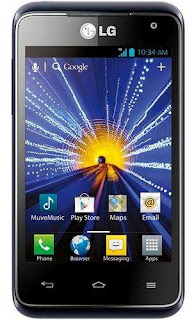
- Dimensions (H x W x D): 4.37 x 2.39 x 0.45 inches
- Weight: 4.72 oz (w/ standard battery)
- Technology: 4G LTE/EVDO/CDMA
- Keypad Style: Virtual
- Form Factor: Touch bar
- Colors: Blue
- Processor Speed: 1.2 Ghz
- Operating System: Android Ice Cream Sandwich (4.0)
- 4G LTE: Yes
- 4G: Yes
- Display: 3.5? TFT capacitive touchscreen display (480 x 320 pixel) with Corning Gorilla Glass
- Storage Capacity: Up to 32GB
- RAM: 1GB
- ROM: 8GB
- Camera: 5.0 MP Rear / VGA Front
- Video: 1080p
- Full HD Video Recording: Up to 1920 x 1080 (1280 x 720 default)
- GPS: Yes
- WLAN: Wi-Fi 802.11 b/g/n, DLNA, Wi-Fi hotspot
- Bluetooth: v4.0 with A2DP
- Preloaded Content: Cricket Storefront and Demo Games
- Supported Music Formats: AAC, AAC+, WMA, MP3 and WAV
- Headset Jack: 3.5mm
- Data Port: USB 2.0 (micro)
- Battery: 1700 mAh Lithium-ion
- Standby Time: Up to 290 hours
- Talk Time: Up to 5.4 hours
- Language: English/Spanish
- E911: Yes
- TTY / TTD: Yes
- HAC Rating: M4/T3
- Warranty: 1 Year
Before using your LG Optimus Regard, you have to check the accessories supplied, such as Travel Charger/USB Cable and Standard Lithium ion battery.
Operating Instruction and solving problem on LG Optimus Regard at a glance.
How to installing the battery?
Follow the instruction below:
1. Use the fingertip cutout at the bottom of the phone to remove the back cover.
2. Align the battery contacts with the terminals in the battery compartment and push the battery down until it clicks into place.
3. Place the back cover over the battery compartment, then press it downward until it clicks into place.
To set up your device, follow the steps below:
1. On the Welcome screen, select your language and touch Next.
2. Set your internet connection settings and touch Next.
3. Select Sign into sign into your Google Account or Get an account to create one. Touch Not nowto skip to the next step. With a Google Account, Google applications are automatically synced between your phone and computer regardless of where you make an update.
4. Set your Google location settings and touch Next.
5. Set up your email accounts and touch Next.
6. Touch Doneto start using the phone.
How to change your unlock Pattern?
Try this step:
1. From the Home screen, touch the Apps Key -> Settings -> Lock screen.
2. Touch Select screen lock.
3. Draw your current unlock pattern.
4. Touch Patternto change it.
To know more about LG Optimus Regard and troubleshooting tips of LG Optimus Regard smartphone, you can download this LG Optimus Regard user manual.
Table contents of LG Optimus Regard user manual
- Important Customer Information
- Technical Details
- Connecting to Mobile Networks
- The Basics
- microSD Card
- Connecting to Wi-Fi Networks
- Calls
- Web
- Communication
- Entertainment
- Tools
- Settings
- Software Update
- Safety
- Specifications
Download LG Optimus Regard user guide manual.pdf (5.73 MB)
Thursday, August 22, 2013
WinMobile Download Accelerator
 While in mobile, being able to stay in touch through the Internet, and downloading information when needed, are becoming a necessity. The wide accessibility of 3G technology such as HSPA of UMTS and widely available wireless-broadband hot spots along with many mobile conveniences make it even more viable. WinMobile Download Accelerator is the tool that make every part of the technologies fit together while boosting and easing your mobile downloading experience. It manages, controls and speeds up your downloading by splitting files into segments and downloads them simultaneously.
WinMobile Download Accelerator is an optimized download manager for Windows Mobile Classic/Professional. Its multi-threaded asynchronous technology accelerates the speed with which you can download files from HTTPS/HTTP/FTP servers. It is fully integrated into the Pocket Internet Explorer by intercepting PIE’s navigation events and redirect any download. WinMobile Download Accelerator will let you take advantage of a faster and more reliable download; optimize your download performance, and help you in recovering interrupted downloads. WinMobile Download Accelerator brings you to the next level of mobile Internet downloading.
More info at adisasta.com
Sunday, August 4, 2013
LG Venice LG730 User Guide Manual Pdf Free Download And Specifications

This is table contents of LG Venice manual
Contents
- Getting to know your phone
- Your Home screen
- Google account setup
- Connecting to Networks and Devices
- Calls
- Contacts
- Messaging
- Camera
- Video camera
- Multimedia
- Utilities
- The web
- Settings
- Trademarks
- Accessories
- Troubleshooting
- Safety
- Limited Warranty Statement
As described at LG and Boost Mobile website, LG Venice comes with these specification and features:
- Technology: CDMA
- Carrier: Boost Mobile
- Frequency: 1.9 GHZ PCS, 800 MHZ CDMA
- Data Transmission: EVDO† Rev. A
- Form Factor: Bar
- Dimension: 4.92″ x 2.64″ x 0.34″ (H x W x D)
- Weight: 4.41 oz
- Platform: Android 4.0 Platform (Ice Cream Sandwich) and Optimus 3.0 UI
- Dislay: 4.3-inch 24-Bit Color IPS TFT (800 x 480 pixels) with corning gorilla glass display screen
- Camera: 5.0 MP AF camera with built-in flash
- Memory: 768 RAM / 4GB ROM
- Card Slod: Yes, up to 32GB memory card (2GB microSD card included)
- Bluetooth: Version: 3.0
- Battery: 1,700 mAh
- Usage Time: Up to 9 Hours
- Standby Time: Up to 159 Hours
- Charging Port: Micro USB
- Price: $220
- Color: Black
To know about operating instruction and troubleshooting tips of LG Venice LG730 smartphone, please download this LG Venice LG730 user guide manual below
Device Overview of LG Venice smartphone:

1. Earpiece
2. Front Camera lens
3. Proximity Sensor
4. Home Key
5. Back Key
6. Power/Lock Key
7. Menu Key
8. Power/Lock Key
9. Earphone Jack
10. Charger/USB Port
11. Microphone
12. Volume Keys
13. Back Camera Lens
14. microSD Card Slot
15. Back Cover
16. Battery
17. Speaker
This LG Venice LG730 (Boost Mobile) user guide manual is available for FREE at LG website,
Download LG Venice LG730 user guide manual.pdf (1.63 MB)
Wednesday, July 17, 2013
Nokia Lumia 820 and Table Contents Manual

This is table contents of Nokia Lumia 820 manual.
- Get started
- Basics
- People & messaging
- Camera
- Maps & navigation
- Internet
- Entertainment
- Office
- Phone management & connectivity
- Help and support
- Product and safety information
- Copyrights and other notices
- Index
As described at Nokia website, Nokia Lumia 820 comes with these specification and features:
- Network: GSM 850 / 900 / 1800 / 1900; HSDPA 850 / 900 / 1900 / 2100; LTE 800 / 900 / 1800 / 2100 / 2600
- SIM: Micro-SIM
- Released: 2012, November
- Price: $399.99 or $49.99 with a contract
- Dimensions: 123.8 x 68.5 x 9.9 mm
- Weight: 160 g
- Colors: Black, Gray, Red, Yellow, White, Blue, Violet
- Platform: Microsoft Windows Phone 8
- Chipset: Qualcomm MSM8960 Snapdragon
- CPU: Dual-core 1.5 GHz Krait
- GPU: Adreno 225
- Display: 4.3 inches AMOLED capacitive touchscreen (480 x 800 pixels); 16M colors; Nokia ClearBlack display
- Multitouch: Yes
- Sensors: Accelerometer, gyro, proximity, compass
- Internal memory: 8 GB storage, 1 GB RAM
- Card slot: microSD, up to 64 GB
- Camera: 8 Megapixel camera (3264×2448 pixels), autofocus, Carl Zeiss Tessar lens, F2.2, dual LED flash, Geo-tagging, VGA front facing camera.
- Video: Yes, 1080p@30fps
- Data Speed: HSDPA 42 Mbps; HSUPA 5.76 Mbps; LTE, Cat3, 50 Mbps UL, 100 Mbps DL
- WLAN: Wi-Fi 802.11 a/b/g/n, Wi-Fi Direct
- Bluetooth: Yes, v3.1 with A2DP, EDR
- NFC: Yes
- GPS: Yes, with A-GPS support and GLONASS
- USB: Yes, microUSB v2.0
- Browser: HTML5
- Messaging: SMS (threaded view), MMS, Email, Push Email, IM
- Radio: No
- Java: No
- Alert types: Vibration; MP3, WAV ringtones
- Loudspeaker: Yes
- 3.5mm jack: Yes with Dolby Headphone sound enhancement
- Others: Active noise cancellation with dedicated mic, MP4/H.264/H.263/WMV player, MP3/WAV/eAAC+/WMA player, SNS integration, Document viewer/editor, Video/photo editor, Voice memo/command and Predictive text input.
- Battery: Li-Ion 1650 mAh (BP-5T)
- Stand-by time: Up to 330 h (3G)
- Talk time: Up to 8 h (3G)
- Music play: Up to 55 h
Before using your Nokia Lumia 820 smartphone, you have to check the accessories supplied, such as Nokia Lumia 820 smartphone, Nokia AC-50U MicroUSB Charger, Battery BP-5T 1650 mAh, Nokia Charging and Data Cable (CA-190CD), Product and Safety Information Booklet, Quick Start Guide, Smart Setup card and NFC tag.
Operating Instruction and troubleshooting tips of Nokia Lumia 820 smartphone.
How to remove the SIM card?
Solution:
1. Switch the phone off.
2. Remove the back cover.
3. If the battery is in, lift it out.
4. Push the card in until you hear a click, then pull the card out.
How to download music from Nokia Music?
Solution:
1. On the start screen, swipe left, and tap Nokia Music.
2. Browse to the song or album you want to download.
3. Tap the price of the song or album. Some songs can only be downloaded as part of an album.
4. If asked, sign in to your Nokia account.
5. Select a payment method
How to download an app, game, or other item?
Solution:
1. Tap Store.
2. Tap an item to view its details.
3. If the item has a price, tap buy, or to try the item for free for a limited time, tap try. If the item is free, tap install. The availability of payment methods depends on your country of residence and your network service
provider.
4. If you’re not signed in to your Microsoft account, sign in now.
5. Follow the instructions shown on your phone.
How to back up and restore data on your phone?
Solution:
- Accidents can happen, so set your phone to back up your settings and stuff to SkyDrive.
- You need a Microsoft account to connect your phone to SkyDrive.
1. On the start screen, swipe left, and tap Settings -> backup.
2. If asked, sign in to your Microsoft Account.
3. Select what to back up and how.
This Nokia Lumia 820 user manual is available for FREE at Nokia website, We merely collect the information, we neither affiliated with the author(s), the website and any brand(s) nor responsible for its content and change of content. (Read our disclaimer before you download the document from the website).
Download Nokia Lumia 820 user manual.pdf (1.14 MB)
Tuesday, July 16, 2013
Nokia Lumia 928 Manual User Guide PDF Download
The Nokia Lumia 928 has physical size of 133 x 68.9 x 10.1 mm. The display screen of 4.5 inches AMOLED capacitive touchscreen (768 x 1280 pixels) with Corning Gorilla Glass 2 Protection and PureMotion HD+ ClearBlack features. It run on Microsoft Windows Phone 8 platform and powered by Dual-core 1.5 GHz Krait Qualcomm MSM8960 Snapdragon processor. The Nokia Lumia 928 equipped with 8 MP camera and available 32 GB internal memory with 1 GB of RAM. By the way if you are owner of this smartphone, now the Nokia Lumia 928 Manual / User Guide has been published by nokia. com. It comes in pdf format and you can download for free.
Ok guys, some important information of Nokia Lumia 928 Manual for example about How to set your phone to lock automatically?, How to copy contacts from a SIM card to your phone?, then about How to update your phone?, and How to connect to a wireless headset? In addition also provide detail information such as about phone layout, keys and menu functions, tutorial make phone calls, instructions using bluetooth and NFC, using messages, email, using camera, web, office, maps, safety, phone settings guide and more.
Table of contents for Nokia Lumia 928 user manual:
Safety
Get started
Basic Make Calls
Bluetooth and NFC
People hub
Messaging
Email
Camera
Internet
Maps and Navigation
Entertainment
Clock, Calendar, and Calculator
Office
Safety and Warranty
Index
Download the Nokia Lumia 928 Manual or User Guide in pdf format here
Friday, July 12, 2013
Micromax A110 Owner manual
Micromax A110 Manual User Guide Download - here we ever talking about the Micromax A116 Canvas HD manual, now we want to share about the Micromax A110 Manual or User Guide in pdf format. As we know it, every manual very important for owner. Like also manual for this phone, provide information for example about How to Install Secure Certificate from SD Card?, How to Pair with Bluetooth Devices?, How to unlock your phone?, then about learn phone basic operations, using home screen, saftey, phone settings guide, using applications, troubleshooting, and more.
Table contents of Micromax A110 user manual
Phone Layout
Getting Started
Placing and Receiving Calls
The Home Screen
Working with menus
Managing Notification
Messaging
Multimedia
Manage Account
Connect to Networks and Devices
Applications
Health and Safety Precautions
Taking Care of Your Device
The Micromax A110 is dual sim phone that support for HSDPA network. Its powered by 1 GHz Dual Core Processor and PowerVR SGX531 GPU graphics. Its runs on Android 4.0.4 (Ice Cream Sandwich) operating system. It has 5.0 inches IPS LCD capacitive touchscreen display also equipped with 8.0 MP camera with LED Flash features.
Download the Micromax A110 manual user guide in pdf format here
Tuesday, July 9, 2013
Blackberry Q10 User Guide Manual Pdf Free Download And Specs

Blackberry Q10 comes with these specification and features:
- Network: 2G, HSDPA, LTE; CDMA 800 / 1900
- Operating System: BlackBerry 10 OS
- Processor: Dual-core 1.5 GHz Cortex-A9
- Graphic Processing Unit (GPU): PowerVR SGX544
- Dimensions: 119.6 x 66.8 x 10.4 mm
- Weight: 139 g
- Display: 3.1 inches Super AMOLED capacitive touchscreen display
- Sensors: Accelerometer, gyro, proximity, compass
- Memory: 2 GB RAM
- microSD Card Slot: Yes, up to 64 GBO
- Internal Storage: 16 GB
- Rear Camera: 8 Megapixel (3264 x 2448 pixels) with autofocus and LED flash
- Ftront Camera: 2 Megapixel camera, 720p
- Video: 1080p@30fps
- Location: GPS, A-GPS
- Bluetooth Version: v4.0 with A2DP
- NFC: Yes
- Wi-Fi Connectivity: Wi-Fi 802.11 a/b/g/n
- USB: microUSB v2.0
- 3.5mm Stereo Earjack: Yes
- Video Player: DivX/XviD/MP4/WMV/H.263/H.264 player
- Music Player: MP3/WMA/WAV/eAAC+/FlAC player
- Battery: Li-Ion 2100 mAh battery
- Standby: -
- Talk time: Up to 10 h
To know about operating instruction and troubleshooting tips of Blackberry Q10 smartphone, you can download this Blackberry Q10 user guide manual below.
Table contents of Blackberry Q10 user guide manual
- Welcome
- BlackBerry 10: new apps and features
- Getting started
- Device Switch
- What makes my BlackBerry 10 device different from other BlackBerry devices?
- Get your message out with the BlackBerry Keyboard
- Connections
- Stay connected with BlackBerry Hub
- See the world through BBM
- Time travel with your camera
- Enhance your experience with BlackBerry World
- Keep current with Calendar
- Remember
- Legal notice
This Blackberry Q10 user guide manual is available for FREE at Blackberry official website,
Download Blackberry Q10 user guide manual.PDF (4.07 MB)
Monday, July 8, 2013
Free Download User Guide Manual Pdf Sony Xperia Acro S And Specification

- Network: HSDPA
- SIM: Mini-SIM
- Announced: 2012, May
- Released: 2012, August
- Dimensions: 126 x 66 x 11.9 mm
- Weight: 147 g (5.19 oz)
- Design: IP57 certified – dust and water resistant, Water proof up to 1 meter and 30 minutes
- Platform: Android OS, v4.0 (Ice Cream Sandwich), planned upgrade to v4.1 (Jelly Bean)
- Chipset: Qualcomm MSM8260 Snapdragon
- CPU: Dual-core 1.5 GHz Scorpion
- GPU: Adreno 220
- Display: 4.3 inches (~342 ppi pixel density) LED-backlit LCD, 720 x 1280 pixels, capacitive touchscreen, 16M colors
- Multitouch: Yes, up to 10 fingers
- Protection: Scratch-resistant shatter proof glass, Sony Mobile BRAVIA Engine
- Internal memory: 16 GB storage (11 GB user available), 1 GB RAM
- Card slot: microSD, up to 32 GB
- Rear Camera: 12 MP, 4000×3000 pixels, autofocus, LED flash
- Video: Yes, 1080p@30fps, continuous autofocus, video light, video stabilize
- Front Camera: Yes, 1.3 MP, 720p@30fps
- Camera Features: Geo-tagging, touch focus, face and smile detection, 3D sweep panorama, image stabilization
- Data Speed: HSDPA, 14.4 Mbps; HSUPA, 5.8 Mbps
- WLAN: Wi-Fi 802.11 b/g/n, Wi-Fi Direct, DLNA, Wi-Fi hotspot
- Bluetooth: Yes, v3.0 with A2DP, EDR
- NFC: Yes
- USB: Yes, microUSB v2.0, USB On-the-go support
- GPS: Yes, with A-GPS support and GLONASS
- Sensors: Accelerometer, gyro, proximity, compass
- 3.5mm jack: Yes
- Battery: Li-Ion 1910 mAh
- Stand-by time: Up to 310 h (3G)
- Talk time: Up to 7 h 10 min (3G)
- Music play: Up to 23 h
- Alert types: Vibration; MP3 ringtones
- Loudspeaker: Yes
- Messaging: SMS (threaded view), MMS, Email, IM, Push Email
- Browser: HTML5, Adobe Flash
- Video Player: MP4/H.263/H.264/WMV player
- Music Player: MP3/eAAC+/WMA/WAV player
- Radio: Stereo FM radio with RDS
- Java: Yes, via Java MIDP emulator
- Colors: White, Black, Pink
- Social Network Services: Yes
- HDMI port: Yes
- Active noise cancellation with dedicated mic: Yes
- Google apps: Google Search, Maps, Gmail, YouTube, Calendar, Google Talk
- Document viewer: Yes
- Predictive text input: Yes
Operating instrucion and troubleshooting tips of Sony Xperia Acro S smartphone at a glance
If your phone is not working as expected, try this solution below:
- Restart your phone.
- Remove and re-insert the SIM card. Then restart your phone.
- Force a restart of the phone if the phone hangs and can’t be restarted normally.
- Update your phone. Updating your phone ensures optimal performance and provides the latest enhancements.
- Reset your phone. (Be patient while resetting your phone. Restarting the phone during a reset procedure may damage the phone permanently.)
How to force the phone to shut down?
Solution:
1. Press and hold down both the volume up key and the power key for 10seconds.
2. After your phone vibrates three times, release the keys. The phone turns off automatically.
How to perform a factory data reset?
Follow the instruction below:
To avoid permanent phone damage, do not restart the phone while a reset procedure is underway.
1. From your Home screen, tap Apps.
2. Find and tap Settings -> Backup & reset.
3. Tap Factory data reset.
4. Tap Reset phone.
5. To confirm, tap Erase everything.
the other instruction smartphone
To know more about complete quick operating guide of Sony Xperia Acro S smartphone, you can download this Sony Xperia Acro S user manual below.
Table Contents of Sony Xperia Acro S user guide
- Important information
- Getting to know your phone
- Calling
- Contacts
- Messaging
- Getting started with Google Play
- PlayNow™ service
- Getting organized
- Scanning with the NeoReader application
- Synchronizing data on your phone
- NFC
- Connecting to wireless networks
- Web browser
- Listening to music with Walkman player
- Taking photos and recording videos
- Using the FM radio
- Playing video clips in Movies
- Sharing content with DLNA Certified devices
- Bluetooth wireless technology
- Connecting your phone to a computer
- Backup and restore application
- Locking and protecting your phone
- Updating your phone
- Troubleshooting
- Recycling your phone
- Legal information
- Index
This Sony Xperia Acro S user manual is available for FREE at Sony Mobile website, We merely collect the information, we neither affiliated with the author(s), the website and any brand(s) nor responsible for its content and change of content. (Read our disclaimer before you download the document from the website).
Download Sony Xperia Acro S User Guide.PDF (2.36 MB)
Saturday, July 6, 2013
HTC DESIRE C MANUAL Download HTC Desire C User Guide
HTC DESIRE C MANUAL - Download HTC Desire C User Guide
This is latest news about the HTC Desire C manual or user guide. Previously in this blog (manual centre) has been discussed about the HTC Desire C Specifications and price. Now The HTC Desire C manual available for download directly at orange.co.uk. The HTC Desire C user guide comes in PDF format with file size is 5.86 MB, 159 pages and support in english language. In the HTC Desire C user manual you can find many reference information and instuction such as about restarting and resetting phone on page 152 and 153, phone settings guide like Backing up settings to Google, protecting phone, conencting settings like using bluetooth and wi-fi, Using HTC Desire C as a wireless router, Installing HTC Sync Manager, using Google Play and Google Maps. Further in the HTC Desire C Owner manual also provides detail information such as about About SkyDrive for HTC Sense, usign Gmail, Facebook for HTC Sense, Using Google+, tutorial Backing up your contacts to the storage card, using camera, recording videos, Backing up your contacts to the storage card, Browsing the Web, messaging settings, Updating the HTC Desire C software, Unlocking the screen, learn phone basics operations, phone part overview with explained menu and key functions, and many more. More detail about table of content for the HTC Desire C manual / user guide read below: |
| HTC DESIRE C MANUAL COVER |
Table of Content for the HTC Desire C manual user guide:
| Unboxing Your first week with your new phone Personalizing Making HTC Desire C truly yours Personalizing HTC Desire C with scenes Phone calls Making a call with Smart dial Messages Search and Web browser Searching HTC Desire C and the Web Camera basics Photos, videos, and music Accounts and sync Adding your social networks, email accounts, and more People | Social Calendar Online storage and services Travel and maps Location settings Using the Clock Google Play and other apps Your phone and computer Where apps, data, and files are stored Connecting HTC Desire C to a computer Internet connections Bluetooth and NFC Settings and security Other essentials Trademarks and copyrights Index |
Get and download the the HTC Desire C manual or user guide here.
Download User Manual Nokia Lumia 820 And Features

This is table contents of Nokia Lumia 820 manual.
- Get started
- Basics
- People & messaging
- Camera
- Maps & navigation
- Internet
- Entertainment
- Office
- Phone management & connectivity
- Help and support
- Product and safety information
- Copyrights and other notices
- Index
As described at Nokia website, Nokia Lumia 820 comes with these specification and features:
- Network: GSM 850 / 900 / 1800 / 1900; HSDPA 850 / 900 / 1900 / 2100; LTE 800 / 900 / 1800 / 2100 / 2600
- SIM: Micro-SIM
- Released: 2012, November
- Price: $399.99 or $49.99 with a contract
- Dimensions: 123.8 x 68.5 x 9.9 mm
- Weight: 160 g
- Colors: Black, Gray, Red, Yellow, White, Blue, Violet
- Platform: Microsoft Windows Phone 8
- Chipset: Qualcomm MSM8960 Snapdragon
- CPU: Dual-core 1.5 GHz Krait
- GPU: Adreno 225
- Display: 4.3 inches AMOLED capacitive touchscreen (480 x 800 pixels); 16M colors; Nokia ClearBlack display
- Multitouch: Yes
- Sensors: Accelerometer, gyro, proximity, compass
- Internal memory: 8 GB storage, 1 GB RAM
- Card slot: microSD, up to 64 GB
- Camera: 8 Megapixel camera (3264×2448 pixels), autofocus, Carl Zeiss Tessar lens, F2.2, dual LED flash, Geo-tagging, VGA front facing camera.
- Video: Yes, 1080p@30fps
- Data Speed: HSDPA 42 Mbps; HSUPA 5.76 Mbps; LTE, Cat3, 50 Mbps UL, 100 Mbps DL
- WLAN: Wi-Fi 802.11 a/b/g/n, Wi-Fi Direct
- Bluetooth: Yes, v3.1 with A2DP, EDR
- NFC: Yes
- GPS: Yes, with A-GPS support and GLONASS
- USB: Yes, microUSB v2.0
- Browser: HTML5
- Messaging: SMS (threaded view), MMS, Email, Push Email, IM
- Radio: No
- Java: No
- Alert types: Vibration; MP3, WAV ringtones
- Loudspeaker: Yes
- 3.5mm jack: Yes with Dolby Headphone sound enhancement
- Others: Active noise cancellation with dedicated mic, MP4/H.264/H.263/WMV player, MP3/WAV/eAAC+/WMA player, SNS integration, Document viewer/editor, Video/photo editor, Voice memo/command and Predictive text input.
- Battery: Li-Ion 1650 mAh (BP-5T)
- Stand-by time: Up to 330 h (3G)
- Talk time: Up to 8 h (3G)
- Music play: Up to 55 h
Before using your Nokia Lumia 820 smartphone, you have to check the accessories supplied, such as Nokia Lumia 820 smartphone, Nokia AC-50U MicroUSB Charger, Battery BP-5T 1650 mAh, Nokia Charging and Data Cable (CA-190CD), Product and Safety Information Booklet, Quick Start Guide, Smart Setup card and NFC tag.
Operating Instruction and troubleshooting tips of Nokia Lumia 820 smartphone.
How to remove the SIM card?
Solution:
1. Switch the phone off.
2. Remove the back cover.
3. If the battery is in, lift it out.
4. Push the card in until you hear a click, then pull the card out.
How to download music from Nokia Music?
Solution:
1. On the start screen, swipe left, and tap Nokia Music.
2. Browse to the song or album you want to download.
3. Tap the price of the song or album. Some songs can only be downloaded as part of an album.
4. If asked, sign in to your Nokia account.
5. Select a payment method
How to download an app, game, or other item?
Solution:
1. Tap Store.
2. Tap an item to view its details.
3. If the item has a price, tap buy, or to try the item for free for a limited time, tap try. If the item is free, tap install. The availability of payment methods depends on your country of residence and your network service
provider.
4. If you’re not signed in to your Microsoft account, sign in now.
5. Follow the instructions shown on your phone.
How to back up and restore data on your phone?
Solution:
- Accidents can happen, so set your phone to back up your settings and stuff to SkyDrive.
- You need a Microsoft account to connect your phone to SkyDrive.
1. On the start screen, swipe left, and tap Settings -> backup.
2. If asked, sign in to your Microsoft Account.
3. Select what to back up and how.
This Nokia Lumia 820 user manual is available for FREE at Nokia website, we merely collect the information, we neither affiliated with the author(s), the website and any brand(s) nor responsible for its content and change of content. (Read our disclaimer before you download the document from the website).
Download Nokia Lumia 820 user manual.pdf (1.14 MB)
Friday, July 5, 2013
Samsung M400 User Guide Free Download And Specs

Samsung M400 mobile phone comes with these specification and features:
- Carrier: Sprint
- Form Factor: Flip
- Product Dimensions: 3.84″ x 1.99″ x .72″
- Weight: 3.65 oz.
- Color: Metallic Silver
- Battery Type: 1000mAh
- Standby: Up to 10 Days
- Talk Time: Up to 4 Hours
- Network/Frequencies: 480 MHz Processor (Qualcomm QSC6155)
- Display: 2.4″
- Camera: 1.3 MP
- Audio: WAC-PCM, WAV-ADPCM, AMR-NB, AMR-WB, AAC, AAC+, eAAC+, WMA, MPEG-1 Audio Layer3, MIDI/QCP
- Connectivity: USB 2.0 (HS) / Bluetooth 3.0
Before using this Samsung M400 mobile phone, you have to check the accessories supplied, such as standard battery, stereo headset, travel charger and user guide.
Device overview of Samsung M400 mobile phone:

1. Earpiece
2. Display
3. Navigation Key
4. Option Key
5. Emergency Contacts
6. Talk Key
7. Voicemail Key
8. Mic
9. Emergency Call Key
10. MENU/OK Key
11. Option Key
12. Speaker Key
13. End/Power Key
14. Back Key
15. Camera Lens
16. 3.5mm Headset Jack
17. Charger/Accessory Jack
18. Speaker
19. Volume Button
20. Voice Recognition Button
21. Camera Button
To know operating guide of Samsung M400 mobile phone, you can download this Samsung M400 user manual.
Table contents of Samsung M400 user manual:
- Get Started
- Phone Basics
- Settings
- Contacts
- Web and Data
- Camera
- Tools and Calendar
- Index
This Sprint Samsung M400 user manual is available for FREE at Samsung website,
Download Samsung M400 user manual.pdf (1.03 MB)
Thursday, July 4, 2013
LG Freedom User Guide Manual Pdf Download And Features

Table contents of LG Freedom user guide manual:
- Important Safety Precautions
- Technical Details
- Phone Overview
- Main Overview
- Getting Started with Your Phone
- Quick Access to Convenient Features
- Entering and Editing Information
- Contacts in Your Phone’s Memory
- Using Phone Menus
- Settings
- My Contacts Backup
- PAC-MAN
- Troubleshooting
- Safety
- Limited Warranty Statement
- Index
LG Freedom mobile phone comes with these specification and features:
- Device Name: LG Freedom
- Carrier: US Cellular
- Price: $2999
- Dimensions: 4.24″ (H) x 2.13″ (W) x 0.63″ (D)
- Weight: 4.67 oz.
- Technology: CDMA
- Frequency: CDMA,PCS,AWS (Tri-Band)
- Data Transmission: 1x
- Display: 3″ WQVGA Capacitive Touchscreen, 256K Color TFT, 240 x 400 pixels.
- Design: Compact Slide-Out QWERTY Keyboard
- Internal Memory: 256 MB
- microSD Memory Slot: supports up to 32 GB memory card
- Camera: 2 megapixel with up to 2x digital zoom
- S-GPS: Yes
- Ringtone: MP3 support
- Standard Battery: 1,000 mAh, Li-Ion
- Talk Time: up to 6 hours
- Standby Time: up to 10 days and 10 hours
Before using your LG Freedom mobile phone, you have to check the accessories supplied, such as standard battery, travel adapter and USB cable, headset, vehicle power adapter, bluetooth headset (HBM-280, HBM-905), and LG TONE Bluetooth Stereo Headset (HBS-700).
Device Overview of LG Freedom mobile phone:

1. Earpiece
2. Home screen
3. Send Key
4. Lock/Unlock Key
5. Earphone Jack
6. Clear/Speaker Key
7. Power/End Key
8. Microphone
9. QWERTY Keyboard
10. Camera Lens
To know about operating instruction and troubleshooting tips of LG Freedom mobile phone, you can download this LG Freedom user guide manual below.
This LG Freedom user guide manual is available for FREE at LG website,
Download LG Freedom User guide Manual.PDF