Monday, September 15, 2014
HTC ONE M8 USER MANUAL
And then in the htc m8 user guide containt a how to use google maps,android browser,using bluethoot, application support, document viewer,GPS Tracking with A-GPS support,threaded view,push mail,SMS,MMS,E-mail,youtube,gmail,how to stunning display,HTC Blinkfeed,HTC share,play store,
To know about HTC M8 user guide,operating intructions you must download htc m8 user guide,in the site we provide free download user guide
free download HTC M8 user manual pdf (3.0MB)

Saturday, September 13, 2014
HTC Butterfly Nice User Manual

HTC Butterfly smartphone Technical Specification and Features:
- Network: GSM 850 / 900 / 1800 / 1900; HSDPA 850 / 2100, HSDPA 850 / 900 / 1900 / 2100; LTE (market dependent)
- Processor: Quad-core 1.5 GHz Krait
- Chipset: Qualcomm APQ8064 Snapdragon
- Operating System: Android v4.1.1 Jelly Bean operating system, planned upgrade to v4.2
- GPU: Adreno 320
- Display: 5.0 inches (1080 x 1920 pixels) Super LCD3 capacitive touchLcd display, 16M colors, with Corning Gorilla Glass 2 protection display and HTC Sense UI 4+
- RAM: 2 GB
- Storage: 16 GB (11 GB user available),
- Card Slot: Yes, microSD card support up to 32 GB
- Rear camera: 8 Megapixel camera (3264×2448 pixels) with autofocus, LED flash, simultaneous HD video and image recording, geo-tagging, face and smile detection.
- Front camera: Yes, 2.1 MP, 1080p@30fps
- Video: Yes, 1080p@30fps with stereo sound rec., video stabilization.
- Data Speed: HSPA+; LTE, Cat3, 50 Mbps UL, 100 Mbps DL
- WLAN: Wi-Fi 802.11 a/b/g/n, Wi-Fi Direct, DLNA, Wi-Fi hotspot
- Bluetooth: yes, v4.0 with A2DP
- NFC: Yes (Market dependent)
- USB: microUSB v2.0 (MHL)
- GPS: Yes, with A-GPS support and GLONASS
- Connectivity: 3.5mm jack with Beats Audio sound enhancement
- Sensor: Accelerometer, gyro, proximity, compass
- Music / Video player: DivX/XviD/MP4/H.263/H.264/WMV player; MP3/eAAC+/WMA/WAV player
- Radio: Stereo FM radio with RDS
- Battery: Non-removable Li-Po 2020 mAh battery
- Dimensions: 143 x 70.5 x 9.1 mm
- Weight: 140 g
- Apps included: Google Search, Maps, Gmail, YouTube, Calendar, Google Talk, Document viewer/editor, Photo viewer/editor, social network, etc
- Predictive text input: Yes
- Alert types: Vibration, MP3, WAV ringtones
- TV-out (via MHL A/V link): Yes
- Browser: HTML5
- Messaging: SMS (threaded view), MMS, Email, Push Email
Operating Instruction of HTC Butterfly at a Glance
How to transfer contacts from your old phone through Bluetooth?
Solution:
1. From the Home Lcd, tap Apps -> Transfer.
2. Tap Next to begin.
3. Choose your old phone’s name and model.
4. On your old phone, turn Bluetooth on and set it to discoverable mode.
5. Follow the onLcd instructions on your old phone and HTC Butterfly to pairthem.
6. Choose the types of data to transfer:
- If you selected Contactsand Calendar, you can choose whether to transfer them to the phone or to an account you’re signed into (such as Exchange ActiveSync).
- If you’re transferring data from the HTC One series (or newer phones), you can also select SMS, Bookmark, and Task. These data types can only be transferred locally to HTC Butterfly.
7. Wait for the data transfer to finish.
How to install an application update?
Solution:
When the Internet connection is on and there’s an available update for one of your apps, the update notification icon appears in the status bar.
1. Slide the Notifications panel open, and then tap the update notification. The Updates Lcd opens with the list of application updates to be installed.
2. Tap an item to view its details, and then tap [>].
3. When you’re done reviewing the updates, tap Install. You’ll be asked to restart HTC Butterfly if needed.
How to keep the camera on standby?
While waiting to capture your next subject, switch HTC Butterfly to Sleep mode and keep the camera ready to take more photos and videos.
1. Open Camera from the lock Lcd or Home Lcd.
2. Take your first batch of photos or videos.
3. To switch HTC Butterfly to Sleep mode, press POWER.
4. When you’re ready to take more photos and videos, just press POWER again to launch the camera.
To know more about operating instruction of HTC Butterfly smartphone, you can download this HTC Butterfly user manual.
Table Contents of HTC Butterfly User Manual
- Setting up your phone
- Your first week with your new phone
- Camera
- Personalizing
- Phone calls
- Messages
- Search and Web browser
- Photos, videos, and music
- Storage
- Sync, backup, and reset
- HTC Sync Manager
- People
- Social
- Calendar
- Online storage and services
- HTC Car
- Travel and maps
- Essential apps
- Google Play and other apps
- Internet connections
- Bluetooth
- Settings and security
- Other essentials
- Trademarks and copyrights
- Index
Download HTC Butterfly User guide Manual.PDF (3.51 MB)
Tuesday, September 9, 2014
HTC Desire SV User Manual
As described at HTC website, HTC Desire SV comes with these specification and features:
- Network: GSM 850 / 900 / 1800 / 1900 – SIM 1 & SIM 2; HSDPA 900 / 2100
- SIM: Dual SIM (Micro-SIM)
- Dimensions: 129.7 x 67.9 x 10.7 mm
- Weight: 131 g
- Platform: Android v4.0.4 (Ice Cream Sandwich)
- Chipset: Qualcomm MSM8225 Snapdragon
- CPU: Dual-core 1 GHz Cortex-A5
- GPU: Adreno 203
- Display: 4.3 inches Super LCD2 capacitive touchLcd (480 x 800 pixels), 16M colors, ~217 ppi pixel density, Touch-sensitive controls.
- Multitouch: Yes with HTC Sense UI
- Internal memory: 4 GB, 768 MB RAM
- Card slot: microSD card, up to 32 GB
- Data speed: HSDPA, HSUPA
- WLAN: Wi-Fi 802.11 b/g/n, Wi-Fi hotspot
- Bluetooth: Yes, v4.0
- USB: Yes, microUSB v2.0
- 3.5mm jack: Yes with Beats Audio sound enhancement
- Camera: 8 MP rear facing camera (3264 x 2448 pixels) with autofocus, LED flash
- Camera Features: Geo-tagging, touch focus
- Video: Yes, 480p@30fps
- GPS: Yes, with A-GPS support
- Java: Yes, via Java MIDP emulator
- Sensors: Accelerometer, proximity
- Messaging: SMS (threaded view), MMS, Email, Push Email
- Browser: HTML5
- Radio: TBD
- Colors: Radical Yellow, Stealth Black
- Other features: SNS integration, Dropbox (25 GB storage), MP4/H.263/H.264/WMV player, MP3/eAAC+/WMA/WAV player, Google Search, Maps, Gmail,YouTube, Calendar, Google Talk, Organizer, Document viewer, Photo viewer/editor, Voice memo/dial, Predictive text input, Alert types: Vibration, MP3, WAV ringtones, loudspeaker.
- Standard battery: Li-Ion 1620 mAh
- Price: $470
Before using this HTC Desire SV, you have to check the accessories supplied, such as HTC Desire SV smartphone, battery (preinstalled), USB cable, power adapter, 3.5mm stereo headset, quick start guide and safety and regulatory guide.
Device overview of HTC Desire SV smartphone:
1. BACK
2. HOME
3. USB connector
4. RECENT APPS (can be configured in Settings to open the Menu)
5. VOLUME
6. Notification LED
7. Proximity sensor
8. POWER
9. 3.5 mm headset jack
To know about operating instruction and troubleshooting tips of HTC Desire SV smartphone, you can download this HTC Desire SV user manual.
Table contents of HTC Desire SV user manual:
- Your first week with your new phone
- Camera
- Personalizing
- Phone calls
- Messages
- Search and Web browser
- Photos, videos, and music
- Accounts and sync
- People
- Social
- Calendar
- Online storage and services
- HTC Car
- Travel and maps
- Essential apps
- Google Play and other apps
- Your phone and computer
- Internet connections
- Settings and security
- Other essentials
- Trademarks and copyrights
- Index
Download HTC Desire SV user manual.pdf (4.10 MB)
Sunday, September 7, 2014
HTC 608T Manual
 |
| HTC 608T |
Saturday, November 30, 2013
HTC Windows Phone 8S User Manual
HTC Windows Phone 8S User Manual
 |
HTC Windows Phone 8S |
Feature :
General | ||
| 2G Network | : | GSM 850 / 900 / 1800 / 1900 |
| 3G Network | : | HSDPA 900 / 2100 |
| SIM | : | Micro-SIM |
Body | ||
| Dimensions | : | 120.5 x 63 x 10.3 mm (4.74 x 2.48 x 0.41 in) |
| Weight | : | 113 g (3.99 oz) |
Display | ||
| Type | : | S-LCD capacitive touchscreen, 16M colors |
| Size | : | 480 x 800 pixels, 4.0 inches (~233 ppi pixel density) |
| Multitouch | : | Yes |
| Protection | : | Corning Gorilla Glass |
Sound | ||
| Alert types | : | Vibration, MP3, WAV ringtones |
| Loudspeaker | : | Yes |
| 3.5mm jack | : | Yes |
| Beats Audio sound enhancement | ||
Memory | ||
| Card slot | : | microSD, up to 32 GB |
| Internal | : | 4 GB, 512 MB RAM |
Data | ||
| GPRS | : | Yes |
| EDGE | : | Yes |
| Speed | : | HSDPA, HSUPA |
| WLAN | : | Wi-Fi 802.11 b/g/n |
| Bluetooth | : | Yes, v3.1 with A2DP, EDR |
| USB | : | Yes, microUSB v2.0 |
Camera | ||
| Primary | : | 5 MP, 2592& |
1093;1944 pixels, autofocus, LED flash, check quality | ||
| Features | : | Geo-tagging, touch focus, face detection |
| Video | : | Yes, 720p@30fps, check quality |
| Secondary | : | No |
Features | ||
| OS | : | Microsoft Windows Phone 8 |
| Chipset | : | Qualcomm Snapdragon S4 |
| CPU | : | Dual-core 1 GHz Krait |
| GPU | : | Adreno 305 |
| Sensors | : | Accelerometer, proximity |
| Messaging | : | SMS (threaded view), MMS, Email, Push Email |
| Browser | : | HTML5 |
| Radio | : | No |
| GPS | : | Yes, with A-GPS support and GLONASS |
| Java | : | No |
| Colors | : | Fiesta Red, Atlantic Blue |
| SNS integration | ||
| 7GB free SkyDrive storage | ||
| MP3/WAV/WMA/eAAC+ player | ||
| MP4/WMV/H.264/H.263 player | ||
| Document viewer | ||
| Voice memo/dial | ||
| Predictive text input | ||
Battery | Non-removable Li-Po 1700 mAh battery | |
| Stand-by | : | No official data |
| Talk time | : | No official data |
HTC Windows Phone 8S User Manual : Download Pdf
Wednesday, October 16, 2013
HTC Zara Desire 601 User Guide Manual Pdf
 |
| Image @urbanstrata |
Friday, August 30, 2013
HTC Wildfire S User Guide Manual
The first pages of the usual basic information about the hardware and the assembly is HTC Wildfire S. HTC allows you to customize your smartphone more personal, you can learn how to customize the Personalization page (page 29). If you want to synchronize your email or social network, see the Account and Sync page (page 56). Specifically for social networks; in Social page (page 71), you can use the Friend Stream, an application that can stream Facebook and Twitter. With HTC Sense, a Facebook application, your account will integrate with Friend Stream, People, Photos, and Calendar. And Peep is a Twitter app for the HTC Wildfire S. If you want to reset the HTC Wildfire S, you can read the manual on page Update and Reset (page 180).
Table contents of this User Manual HTC User Wildfire S:
PreparationAll about how to operate the HTC Wildfire S in the user manual is a guide. You can get this HTC Wildfire users manual in English here.
Basic
Personalization
Phone Calls
Search and Web Browser
Account and Sync
People
Social
Camera
Video and Photos Musics
market and other applications
messages
Calendar
Map and Location
HTC Sync
HTCSense.com
Keyboard
Internet connection
Bluetooth
Security
Settings
Update and Reset
Trademarks and Copyrights
index.
Friday, July 12, 2013
HTC Desire U unveiled specs features of this midrange phone
Ahead of the Mobile World Congress 2013, HTC has unveiled a 4-inch midrange Android phone for its native market. The device dubbed the Desire U is a nice handset, but there is nothing revolutionary with the phone. Under the hood, the handset has moderate specs and features. HTC plans to sell the machine in Taiwan for a lower price of 7990 New Taiwan Dollar, which is equal to $274. The Taiwanese carrier Chunghwa Telecom will provide the device on contract for NT$ 291 per month.
HTC Desire U 4 Specs
The new 4-inch handset is a good handset as a midmarket product. It is up with a 4-inch capacitive touch display that features a resolution of 800 x 480 pixels. It is meant to run Android 4.0 Ice Cream Sandwich out of the box and it also has HTC’s Sense UI overlay. Indeed, these specs are paltry when compared to the current range of midrange phones. Anyway, as a device for budget markets, the Desire U 4 is looking good.
 The device is just 9.33 thick and it weighs at 119 grams. So users can carry around the phone as no burden at all. Camera wise, the HTC phone sports a 5MP autofocus rear camera with LED flash. It also has a front camera for video chatting. The machine is powered by a moderate 1GHz processor and 512MB of RAM. 4GB internal memory is another point of attraction. You can also slot in external memory cards thanks to a built-in microSD slot. Power backup is provided by a 1,650mAh battery.
Furthermore, the device shows off a micro-drilled cover art on the back panel. Well, it adds an impression to the device. The HTC log is engraved in the middle part of the rear panel like most other HTC phones. The handset further touts Beats Audio integration for nice music experience. When it comes to connectivity options, they include Wi-Fi, 3G, Bluetooth 4.0, GPS and more. It will come in black and white options.
HTC Desire U Vs Other Midmarket Phones
The market is stuffed with lots of midrange handsets. Samsung is the leader. The Korean tech maker is known for rolling out a wide variety of midrange phones for different customers. Quite recently, the company launched handsets like Galaxy S3 Mini, Galaxy Axiom for U.S., Galaxy Grand and Galaxy Xcover 2 and so on. It is also to bring out two more phones at MWC 2013, likely the Galaxy Pocket Plus and Galaxy Young. Just behind Samsung, Sony is gradually growing as a key midrange vendor. The Japan firm has produced many handsets last year. The list includes the likes of Xperia U, Xperia Tipo, Miro and many more.
Anyway, HTC can sell the Desire U 4 in Taiwan as a nice midrange phone. The company will find it hard to get a place for the device in global markets. Most of its alternatives are more powerful and feature-rich. In Taiwan as well, some say that the device will feel bad to receive better acceptance. HTC is really struggling in market. Beyond figures, the company’s CEO Peter Chou has itself admitted the fact. Talking to media, he recently said that HTC could not perform well last year; it was due to the lack of fund for immense marketing as its rivals do.
HTC M7
Whatever are the things, HTC is now evidently working on is next Android flagship, the M7. The company will most likely unveil the device at MWC. It is going to be the company’s next member to the 5-inch 1080p phones. It has already churned out devices like the J Butterfly with 5-inch FullHD screen. The Butterfly also has a U.S. brother called the DROID DNA for Verizon. Anyway, apart from this handset, HTC is likely to bring out the M7, yet another FHD handset from the Taiwan tech firm.
Wednesday, July 10, 2013
HTC Windows Phone 8X Smart Phone PDF Manual Guide

HTC Windows Phone 8X specifications:
- 2G Network GSM 850 / 900 / 1800 / 1900
- 3G Network HSDPA 850 / 900 / 1900 / 2100
- SIM Micro-SIM
- Announced 2012, September
- Status Available. Released 2012, November
- Body Dimensions 132.4 x 66.2 x 10.1 mm (5.21 x 2.61 x 0.40 in)
- Weight 130 g (4.59 oz)
- Display Type S-LCD2 capacitive touchscreen, 16M colors
- Size 720 x 1280 pixels, 4.3 inches (~342 ppi pixel density)
- Multitouch Yes
- Protection Corning Gorilla Glass 2
- Sound Alert types Vibration; MP3 ringtones
- Loudspeaker Yes
- 3.5mm jack Yes
- - Beats Audio sound enhancement
- Memory Card slot No
- Internal 16 GB storage, 1 GB RAM
- Data GPRS Yes
- EDGE Yes
- Speed HSDPA; HSUPA
- WLAN Wi-Fi 802.11 a/b/g/n, dual-band
- Bluetooth Yes, v2.1 with A2DP, EDR
- NFC Yes
- USB Yes, microUSB v2.0
- Camera Primary 8 MP, 3264 x 2448 pixels, autofocus, LED flash
- Features Geo-tagging, touch focus
- Video Yes, 1080p@30fps, continuous autofocus, video light
- Secondary Yes, 2.1MP, 1080p video
- Features OS Microsoft Windows Phone 8
- Chipset Qualcomm MSM8960 Snapdragon
- CPU Dual-core 1.5 GHz Krait
- GPU Adreno 225
- Sensors Accelerometer, proximity, compass
- Messaging SMS (threaded view), MMS, Email, IM, Push Email
- Browser HTML5
- Radio No
- GPS Yes, with A-GPS support and GLONASS
- Java No
- Colors California Blue, Graphite Black, Flame Red, Limelight Yellow
HTC Windows Phone 8X Manual Guidebook PDF Download click here
( not available online)
Tuesday, July 9, 2013
HTC Deluxe Smart Phone Manual Guidebook Design and Review

HTC Deluxe specifications:
- 2G Network GSM 850 / 900 / 1800 / 1900
- 3G Network HSDPA 850 / 900 / 1900 / 2100
- 4G Network LTE
- SIM Micro-SIM
- Announced Exp. announcement 2013, January
- Status Rumored. Exp. release 2013, Q2
- Body Dimensions -
- Weight -
- - Touch-sensitive controls
- Display Type Super LCD3 capacitive touchscreen, 16M colors
- Size 1080 x 1920 pixels, 5.0 inches (~441 ppi pixel density)
- Multitouch Yes
- Protection Corning Gorilla Glass 2
- - HTC Sense UI 4+
- Sound Alert types Vibration, MP3, WAV ringtones
- Loudspeaker Yes
- 3.5mm jack Yes
- Memory Card slot TBD
- Internal 16 GB (11 GB user available) storage, 2 GB RAM
- Data GPRS Yes
- EDGE Yes
- Speed HSPA+; LTE, Cat3, 50 Mbps UL, 100 Mbps DL
- WLAN Wi-Fi 802.11 a/b/g/n, Wi-Fi Direct, DLNA, Wi-Fi hotspot
- Bluetooth Yes, v4.0 with A2DP
- NFC Yes
- USB Yes, microUSB (MHL) v2.0
- Camera Primary 8 MP, 3264x2448 pixels, autofocus, LED flash
- Features Simultaneous HD video and image recording, geo-tagging, face and smile detection
- Video Yes, 1080p@30fps, stereo sound rec., video stabilization
- Secondary Yes, 2.1 MP, 1080p@30fps
- Features OS Android OS, v4.1 (Jelly Bean), upgradable to v4.2 (Jelly Bean)
- CPU Quad-core 1.5 GHz Krait
- GPU Adreno 320
- Sensors Accelerometer, gyro, proximity, compass
- Messaging SMS (threaded view), MMS, Email, Push Email
- Browser HTML5
- Radio TBD
- GPS Yes, with A-GPS support and GLONASS
- Java Yes, via Java MIDP emulator
- Colors Black
HTC Deluxe Manual Guidebook PDF Download click here
( not available online)
Sunday, July 7, 2013
The black HTC One

According to recent rumors, the HTC One should launch on all four major US carriers, although not simultaneously: according to HTC Source, Verizon will release its One later than its three competitors, tipped for March 22nd. However, pricing should supposedly remain consistent across all operators: $300 for 64GB capacity and $200 for 32GB, with the other specs (4.7-inch full HD display, 1.7GHz quad-core Snapdragon) remaining unchanged.
Saturday, July 6, 2013
HTC DESIRE C MANUAL Download HTC Desire C User Guide
HTC DESIRE C MANUAL - Download HTC Desire C User Guide
This is latest news about the HTC Desire C manual or user guide. Previously in this blog (manual centre) has been discussed about the HTC Desire C Specifications and price. Now The HTC Desire C manual available for download directly at orange.co.uk. The HTC Desire C user guide comes in PDF format with file size is 5.86 MB, 159 pages and support in english language. In the HTC Desire C user manual you can find many reference information and instuction such as about restarting and resetting phone on page 152 and 153, phone settings guide like Backing up settings to Google, protecting phone, conencting settings like using bluetooth and wi-fi, Using HTC Desire C as a wireless router, Installing HTC Sync Manager, using Google Play and Google Maps. Further in the HTC Desire C Owner manual also provides detail information such as about About SkyDrive for HTC Sense, usign Gmail, Facebook for HTC Sense, Using Google+, tutorial Backing up your contacts to the storage card, using camera, recording videos, Backing up your contacts to the storage card, Browsing the Web, messaging settings, Updating the HTC Desire C software, Unlocking the screen, learn phone basics operations, phone part overview with explained menu and key functions, and many more. More detail about table of content for the HTC Desire C manual / user guide read below: |
| HTC DESIRE C MANUAL COVER |
Table of Content for the HTC Desire C manual user guide:
| Unboxing Your first week with your new phone Personalizing Making HTC Desire C truly yours Personalizing HTC Desire C with scenes Phone calls Making a call with Smart dial Messages Search and Web browser Searching HTC Desire C and the Web Camera basics Photos, videos, and music Accounts and sync Adding your social networks, email accounts, and more People | Social Calendar Online storage and services Travel and maps Location settings Using the Clock Google Play and other apps Your phone and computer Where apps, data, and files are stored Connecting HTC Desire C to a computer Internet connections Bluetooth and NFC Settings and security Other essentials Trademarks and copyrights Index |
Get and download the the HTC Desire C manual or user guide here.
Wednesday, July 3, 2013
HTC One Manual Aka User Guide Download
HTC One Manual Aka User Guide Download - Talking about the HTC smartphone manual, here blogger blog ever discuss about HTC Droid DNA manual. Ok, now about HTC One manual or user guide pdf. If you are owner of this smartphone, as usual you must read the tutorial or instructions to operating this phone. The HTC one user manual provide reference information such as about How to transfer content from another Android Phone with Data Connection?, then about How to update the HTC One software?, or about How to secure your HTC One with a personal touch? Other important information also about learn phone basics operations, make phone calls, phone layout with menu keys, using contacts and messages, using applications like camera and web, phone settings guide, safety, and more. The HTC One pdf manual consisting of 239 pages with file size of 34.44 MB and available in english language. Read the table of content below:
Table Contents of HTC One User Manual / User Guide:
Get Started
Phone Basics
Phone Calls
Accounts and Messaging
Apps and Entertainment
Web and Data
Camera and Video
Tools and Calendar
Settings
Copyright Information
Radio Frequency Exposure Operating Instructions
Index
The HTC One is smartphone that support for GSM/HSDPA/LTE network. It comes with Quad-core 1.7 GHz Krait 300 processor and runs on Android v4.1.2 (Jelly Bean) operating system. Its also equipped with 4 MP rear camera, 2.1 MP front camera and available 2 GB of RAM. The phone measuring 137.4 x 68.2 x 9.3 mm and it has 4.7 inches Super LCD3 capacitive touchscreen display with 1080 x 1920 pixels resolution and with Corning Gorilla Glass 2 also HTC Sense UI v5 features. For connectivity support via bluetooth, wi-fi, USB, gps and nfc. The price of this phone is $549.99.
Download HTC One manual aka user guide in pdf format here
Sunday, June 30, 2013
Free Download User Guide pdf Smartphone HTC Windows Phone
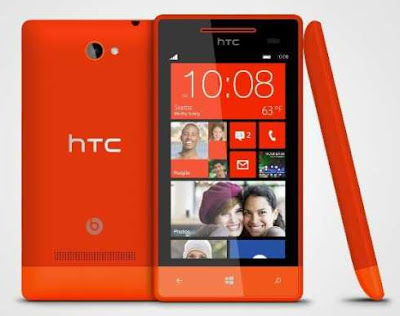
As described at HTC website, HTC Windows Phone 8S comes with these specification and features:
- Network: GSM 850 / 900 / 1800 / 1900; HSDPA 900 / 2100
- SIM: Micro-SIM
- Status: Released 2012, November
- Dimensions: 120.5 x 63 x 10.3 mm
- Weight: 113 g
- Platform: Microsoft Windows Phone 8
- Processor: Dual-core 1 GHz Krait Qualcomm Snapdragon S4
- GPU: Adreno 305
- Display: 4.0 inches S-LCD capacitive touchscreen display (480 x 800 pixels), 16M colors with Corning Gorilla Glass protection
- Multitouch: Yes
- Sensors: Accelerometer, proximity
- Card slot: microSD, up to 32 GB
- Internal memory: 4 GB, 512 MB RAM
- Camera: 5 MP rear camera (2592х1944 pixels) with autofocus and LED flash
- Camera Features: Geo-tagging, touch focus, face detection
- Video: Yes, 720p@30fps
- Data Speed: HSDPA, HSUPA
- WLAN: Wi-Fi 802.11 b/g/n
- Bluetooth: Yes, v3.1 with A2DP, EDR
- USB: Yes, microUSB v2.0
- Battery: non-removable Li-Po 1700 mAh battery
- Alert: Vibration, MP3, WAV ringtones
- Loudspeaker: Yes
- 3.5mm jack: Yes with Beats Audio sound enhancement
- Messaging: SMS (threaded view), MMS, Email, Push Email
- Browser: HTML5
- Radio: No
- Location: GPS / A-GPS and GLONASS
- Colors: Domino, Fiesta Red, Atlantic Blue, High-Rise Gray
- Music Player: MP3/WAV/WMA/eAAC+ player
- Video Player: MP4/WMV/H.264/H.263 player
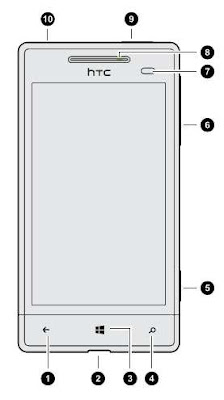
Device overview of HTC Windows Phone 8S smartphone:
1. BACK Key
2. USB connector
3. START Key
4. SEARCH Key
5. Camera button
6. VOLUME
7. Proximity sensor
8. Notification LED
9. POWER
10. 3.5mm headset jack
Operating Instruction and troubleshooting tips of HTC Windows Phone 8S at a glance.
How to get and install updates?
1. On the Start screen, slide to the left.
2. Tap Settings -> phone update.
3. Select the Tell me when updates are available for my phonecheck box.
4. Choose whether you want to allow automatic downloading of updates if your data settings allow it. If you disable this option, your phone will only download
updates over Wi-Fi or when it’s connected to your computer.
How to turn the data connection on or off?
1. On the Start screen, slide to the left.
2. Tap Settings -> mobile network.
3. Tap the Data connection On/Off switch.
How to add a POP3/IMAP email account?
1. On the Start screen, slide to the left.
2. Tap Settings> email+accounts.
3. Tap add an account.
4. Choose the type of email account that you want.
If you don’t see it in the account list, tap other account
How to customize your lock screen notifications?
1. On the Start screen, slide to the left.
2. Tap Settings -> lock screen.
3. Choose an app for detailed notifications.
4. Choose up to five apps for quick notifications.
5. When you’re done, press left arrow or Windows menu.
To know more about instruction manual and troubleshooting tips of HTC Windows Phone 8S smartphone, you can download this HTC Windows Phone 8S user manual below.
Table contents of HTC Windows Phone 8S manual.
- Setting up your phone
- Your first week with your new phone
- Camera
- Phone calls
- People
- Keyboard
- Messaging
- Photos, videos, and music
- Storage
- Sync and Backup
- Internet connections
- Search and Web browser
- Maps and location
- Calendar
- More apps
- Bluetooth
- Settings
- Security
- Update and reset
Download HTC Windows Phone 8S user guide pdf (1.63MB)
Tuesday, June 25, 2013
HTC Windows Phone 8S User Manual
 |
| Google Images |
- Network: GSM 850 / 900 / 1800 / 1900; HSDPA 900 / 2100
- SIM: Micro-SIM
- Status: Released 2012, November
- Dimensions: 120.5 x 63 x 10.3 mm
- Weight: 113 g
- Platform: Microsoft Windows Phone 8
- Processor: Dual-core 1 GHz Krait Qualcomm Snapdragon S4
- GPU: Adreno 305
- Display: 4.0 inches S-LCD capacitive touchscreen display (480 x 800 pixels), 16M colors with Corning Gorilla Glass protection
- Multitouch: Yes
- Sensors: Accelerometer, proximity
- Card slot: microSD, up to 32 GB
- Internal memory: 4 GB, 512 MB RAM
- Camera: 5 MP rear camera (2592х1944 pixels) with autofocus and LED flash
- Camera Features: Geo-tagging, touch focus, face detection
- Video: Yes, 720p@30fps
- Data Speed: HSDPA, HSUPA
- WLAN: Wi-Fi 802.11 b/g/n
- Bluetooth: Yes, v3.1 with A2DP, EDR
- USB: Yes, microUSB v2.0
- Battery: non-removable Li-Po 1700 mAh battery
- Alert: Vibration, MP3, WAV ringtones
- Loudspeaker: Yes
- 3.5mm jack: Yes with Beats Audio sound enhancement
- Messaging: SMS (threaded view), MMS, Email, Push Email
- Browser: HTML5
- Radio: No
- Location: GPS / A-GPS and GLONASS
- Colors: Domino, Fiesta Red, Atlantic Blue, High-Rise Gray
- Music Player: MP3/WAV/WMA/eAAC+ player
- Video Player: MP4/WMV/H.264/H.263 player
- Setting up your phone
- Your first week with your new phone
- Camera
- Phone calls
- People
- Keyboard
- Messaging
- Photos, videos, and music
- Storage
- Sync and Backup
- Internet connections
- Search and Web browser
- Maps and location
- Calendar
- More apps
- Bluetooth
- Settings
- Security
- Update and reset